Learn how to detect and prevent SMS pumping and OTP toll fraud by capping verification codes per device and local IP, with bots and masked requests held back.
SMS pumping floods your verification flow with OTP requests, often toward number ranges the fraudster profits from, and the bill lands on you. ShieldLabs identifies the session asking for each code (the durable device behind it, the account it belongs to and its risk signals, bots included), so you can cap how many paid messages a single device or local network can trigger.
SMS pumping, also called OTP toll fraud or artificially inflated traffic (AIT), is the abuse of any flow that sends a one-time code over SMS (signup, login, phone verification or the resend-code step). The fraudster scripts huge volumes of OTP requests, frequently to premium-rate or partner number ranges they share revenue on, so each verification SMS you pay to send turns into their payout while you absorb the messaging cost. The revenue-share mechanism behind it is sometimes called International Revenue Sharing Fraud (IRSF).
The phone number, the SMS and the carrier stay in your messaging stack. ShieldLabs resolves the session that asks for the code to a set of identifiers and reads its risk signals. The anchor is the durable Device ID: it holds through cleared cookies, incognito and IP changes, while the visitor_id (one device plus one cookie) changes whenever cookies are cleared. That gives you five things a pumper cannot easily rotate away:
Layer
What it answers
Where you read it
Latency
Account
”How many accounts has this device already opened?”
The History API by device_id: the distinct user_hid values
On demand
Identification
”Is this the same device, even after cleared cookies, incognito, or a new IP?”
”Are the accounts on this device run by one person?”
Multi-accounting on those users, in the analytics dashboard, the API and webhooks
When detected
The Risk Score (0-100) reads the session’s risk signals. Pumping traffic is scripted, so bot and automation signals are common on it (Browser Automation, JavaScript Disabled), together with Datacenter IP, VPN, Proxy, Tor and Anti-detect Browser. ShieldLabs tells you which device is asking and what its risk signals are; you choose whether to send the SMS.
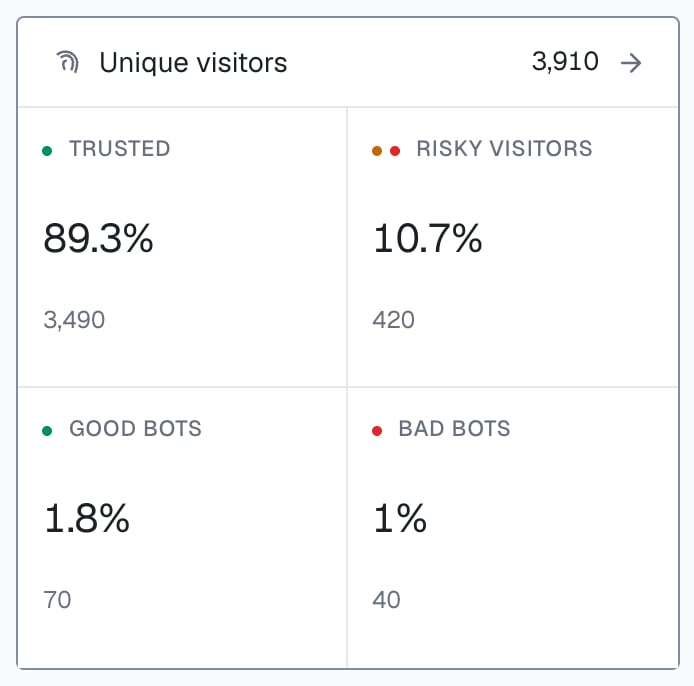
Unique visitors in the analytics dashboard: good bots are search-engine crawlers, bad bots are automated browsers.
Keep the send counter and the cap in your backend, keyed on the Device ID and the local IP that ShieldLabs returns: tally sends per device and per local IP in your own datastore and enforce the limit there.
Identify the session at the exact step your app is about to send a verification SMS, then split the work cleanly: ShieldLabs returns the durable Device ID, the risk signals, and the Risk Score; your backend keeps the counter. Key a per-device send counter on the Device ID (and a second one on local_ip.ip, the address the browser itself reports) so a fraudster who rotates public IPs and clears cookies still hits the same caps. Weigh a masked or automated session more heavily: a Datacenter or VPN session, or a scripted browser, asking for codes in bulk is the typical pumping shape, so it earns a tighter cap or a CAPTCHA before the send. A request that arrives without an identification is unverified: no paid SMS until it passes a CAPTCHA. A throttle keyed only on the public IP, a cookie or a session resets as fast as the fraudster rotates it and never builds; keying it on the Device ID is what makes the rotation stop working. Apply the same per-device counter to the resend-code button too. Re-requesting a code is the cheapest way for one session to run up the bill, so each resend should increment the cap, not reset it. The steps below wire it up.
Start Free with 5,000 identifications, one time, no credit card, or log in. In the analytics dashboard, add the domain you want to protect under Integration > Domains, then open Integration > API keys and copy its keys with the copy button next to each. The Public Key loads the snippet in the browser. Keep the server credentials on your backend: the Private API Key reads the History API, and each webhook endpoint has its own whsec_… signing secret. See API keys and Integration.
2
Identify the session at the OTP step
Add the snippet to your app and identify the session right where the code is requested, resends included. Call forceCheckAnonymous before an account exists (a signup or phone-verify form), or forceCheckAuthenticatedUser with the account’s hashed User HID when the user is signed in. The force calls run a fresh identification for every code request; a plain check is skipped when the same browser was checked in the same visit within the last five minutes, and the request would reach your backend without a request ID. Start the check when the user starts filling the form (its first focus): onInitialized fires when the check starts, before the snippet has sent the identification, so do not navigate away inside it. For a resend button, call the force method on the click and send the request with fetch() from onInitialized, so the page stays open while the identification completes. Pass a hash, never a raw email, phone number, or user id.
verify.html
<script type="module"> const mod = await import( 'https://cdn.shieldlabs.ai/snippet.js?publicKey=YOUR_PUBLIC_KEY' ); const form = document.getElementById('otp-form'); // onInitialized fires when the check starts, before the snippet sends it. // Start the fresh identification when the form comes into use, so it is sent // while the user fills the form, and let the form submit normally. const identify = () => { // No account yet: forceCheckAnonymous. Signed in: forceCheckAuthenticatedUser. mod.forceCheckAnonymous({ onInitialized: (result) => { if (result.status === 'initialized') { document.getElementById('shieldlabs-request-id').value = result.requestID; } }, }); }; if (form.contains(document.activeElement)) identify(); // already focused (autofocus) else form.addEventListener('focusin', identify, { once: true });</script><form id="otp-form" method="POST" action="/api/request-otp"> <input type="hidden" id="shieldlabs-request-id" name="shieldlabsRequestId" /> <input type="tel" name="phone" placeholder="Phone number" /> <button type="submit">Send code</button></form>
3
Read the device and signals before you send
Before your backend calls the SMS provider, read the scored result for that request ID with the shared waitForScore helper (your webhook cache, falling back to the History API). Read the durable device_id, the risk_score and the local IP: these are what your counters key on.
api/request-otp.js
app.post('/api/request-otp', async (req, res) => { const { phone, shieldlabsRequestId } = req.body; // Pull the ShieldLabs result for this session: the webhook `data` object // (the shared helper maps a History fallback to the same field names). const risk = await waitForScore(shieldlabsRequestId, 1500); if (!risk || risk.risk_score > 100) { // No identification (the snippet did not run, or a script skipped it) or // the 999 rate-limit marker: unverified, so no paid SMS without a CAPTCHA. return res.status(200).json({ action: 'require_captcha' }); } const deviceId = risk.device_id; const localIp = risk.local_ip?.ip; // the address the browser reports, not the public IP const flags = risk.detection_flags ?? {}; // An all-zero Device ID means no usable device signals reached ShieldLabs. // Fall back to the local IP counter instead of letting many distinct // sessions collapse onto one zero key, and hold the send for a CAPTCHA. const deviceKey = deviceId !== NIL_DEVICE ? deviceId : null; // Your counters, in your datastore, keyed on what ShieldLabs returns. const perDevice = deviceKey ? await bumpSendCount(`otp:dev:${deviceKey}`) : 0; // 1h window const perLocal = localIp ? await bumpSendCount(`otp:lip:${localIp}`) : 0; // 1h window // 1. One device (or one local network) flooding the verify flow, // even across rotated public IPs and cleared cookies. if (perDevice > YOUR_DEVICE_SEND_LIMIT || perLocal > YOUR_LOCAL_IP_SEND_LIMIT) { return res.status(429).json({ action: 'rate_limited' }); } // 2. No usable device, a bot, or a masked session asking for paid codes. if (!deviceKey || flags.browser_automation || flags.javascript_disabled || band(risk.risk_score) === 'Dangerous') { return res.status(200).json({ action: 'require_captcha' }); } // Clear enough to send the SMS through your provider. await sendVerificationSms(phone); return res.json({ action: 'sent' });});
Combine keys for defense in depth: count sends on the Device ID (holds through IP rotation and cleared cookies) and on local_ip.ip, the address the browser itself reports. When a pumper rotates public IPs through a proxy pool, local_ip.ip often stays the same, so the local-IP cap still trips. The analytics dashboard shows this value as Local IP.
4
Weigh masked sessions with detection_flags
When the policy depends on a specific tell rather than just the band, read the boolean detection_flags on the webhook: browser_automation, javascript_disabled, datacenter_ip, vpn, proxy, tor, anti_detect_browser, abuser, ip_mismatch and more. These are stable booleans built for branching, so “datacenter plus a hot device counter, require a CAPTCHA” reads cleanly. ip_mismatch: true means the public IP and local_ip are different addresses: treat it as supporting evidence, not a trigger on its own. It is informational, adds nothing to the Risk Score, and can be ordinary on mobile networks, so compare local_ip.country with public_ip.country rather than branching on the flag alone. Use the signals array ({ name, weight }) for the explainable breakdown.
function otpFriction(risk, perDevice) { if (!risk || risk.risk_score > 100 || risk.device_id === NIL_DEVICE) return 'captcha'; // no identification, the 999 marker or no usable device const flags = risk.detection_flags ?? {}; // Masked infrastructure or automation plus a warming device counter is the pumping shape. if ((flags.datacenter_ip || flags.proxy || flags.browser_automation) && perDevice > 3) { return 'captcha'; } if (band(risk.risk_score) === 'Dangerous') return 'captcha'; return 'send';}
A legitimate customer on a corporate VPN sometimes verifies a phone too. Masking tightens the cap or adds a CAPTCHA before the send; reserve a hard deny for the combination of masked infrastructure, a device or local IP already over your send limit, and a device linked to a user with a Multi-accounting event.
5
Catch the fan-out with Multi-accounting
Pumping for signup codes usually means one person opening many accounts. ShieldLabs detects this as the Multi-accountingHigh-Risk Event on those users: several accounts run by one person, linked through the devices and network they share, at Medium or High confidence. It is keyed on the account, so call checkAuthenticatedUser with the hashed User HID once an account exists.
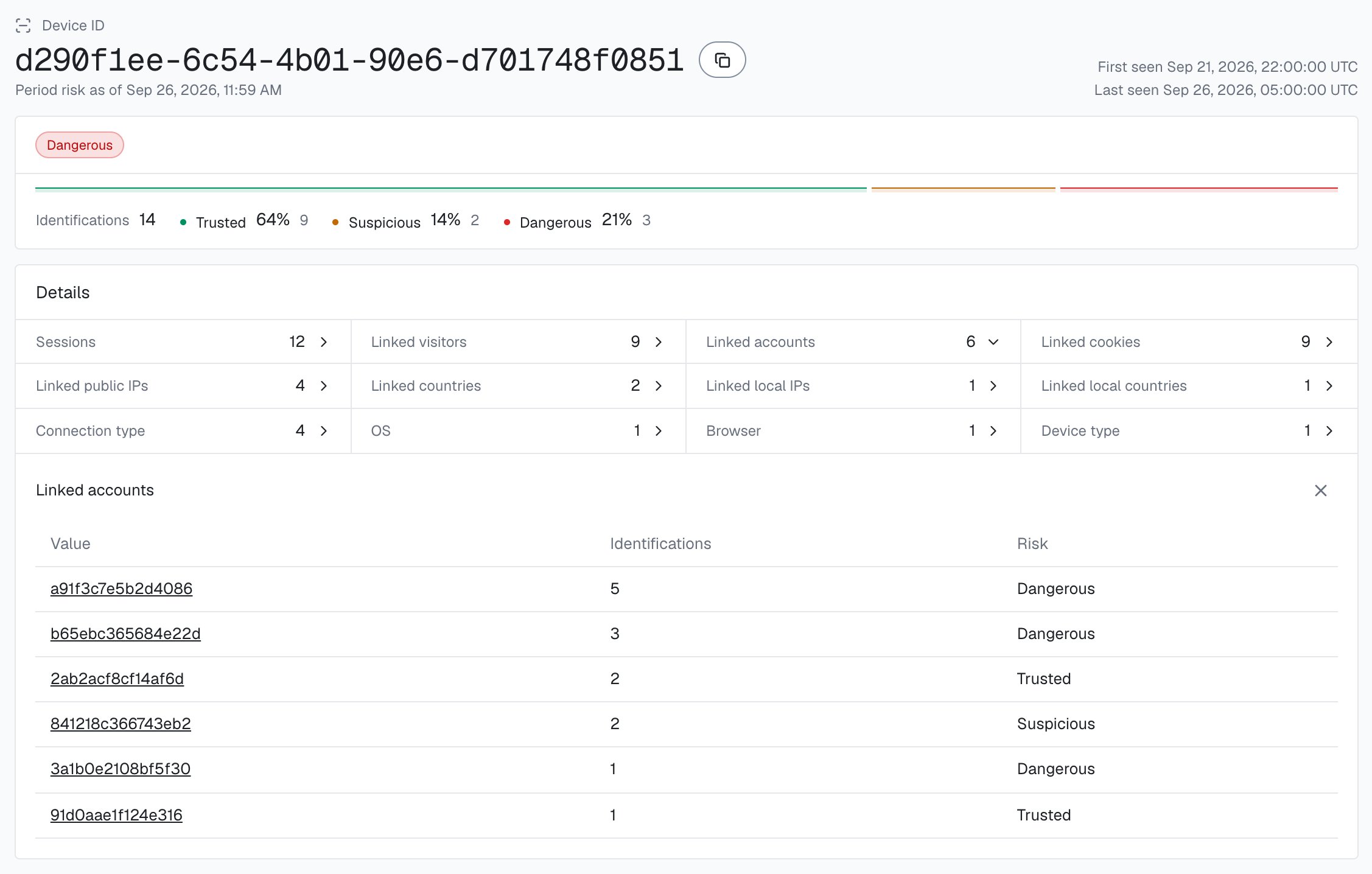
One Device ID in the analytics dashboard, with every account linked to it.
High-Risk Events are available in the analytics dashboard, the API and webhooks. When a Multi-accounting event arrives for a user through the API or webhooks, or when you review it in the analytics dashboard, act on the account, starting with High confidence: add the User HID, with the devices and local IPs linked to it, to a watchlist in your datastore; at the send step, check the incoming device_id and local_ip.ip against it. The History API returns every device an account has used, by user_hid. For a pumper that also clears cookies between requests, reconstruct a device’s fan-out live from the History API with the shared accountsBehindDevice helper, which leaves out "anonymous".
// Call it inside the request-otp handler, after the guard; a non-null result is the action.async function fanOutAction(deviceId) { const accounts = await accountsBehindDevice(deviceId).catch(() => null); if (accounts === null) return 'require_captcha'; // a failed History read is unverified if (accounts >= YOUR_ACCOUNT_FANOUT_LIMIT) return 'rate_limited'; return null;}
History reads on account.shieldlabs.ai, the webhook stream and exports from the analytics dashboard are free. Lean on those sources for routine watchlisting.
6
Tune to your product
A consumer signup flow sends more first-time verifications than a niche B2B tool. Start in logging-only mode, watch how many OTP requests your real sessions make per device and per local IP, then set the send caps and the band that match your traffic before you turn on enforcement. A device that requests many codes but rarely completes a verification is a classic pumping shape, so track completion against the device_id and feed a high request-to-completion ratio into the same watchlist.
You do not need a real attack to confirm the cap holds. Open your phone-verify page and request a code, noting the device_id on the webhook. Now repeat the ways that should not reset your counter: a fresh incognito window, the same browser after clearing cookies and storage, and (where you can) a second public IP. Because the Device ID is server-derived rather than stored, the same device_id comes back each time, so your per-device send counter keeps climbing across all of those attempts instead of starting over: one device cannot reset its way into a flood of paid SMS. Switch to a genuinely different physical device and the device_id changes, confirming the key is tied to the device and not to anything a pumper can clear.
A guide, not a rule. The right send caps depend entirely on your verification flow. Layer the conditions: friction should rise as more of them stack.
Condition
Suggested action at the send step
Risk Score in the Trusted band (under 30), under your send cap
Send the code
No identification for the request, or an all-zero Device ID
Require a CAPTCHA before sending
Risk Score in the Dangerous band (60+), or Browser Automation or JavaScript Disabled
Require a CAPTCHA before sending
A masking signal (datacenter_ip, proxy) on a device whose send counter is already climbing
Require a CAPTCHA before sending
Device ID or local IP over your send cap (across rotated IPs)
Rate-limit (HTTP 429), do not send
Device linked to a user with a Multi-accounting event
Treat as a pumping source: deny the send, then review
A device driving a flood of signup OTPs is often the same one behind new account fraud, and a verify flow under bulk pressure can also be the tail of a credential-stuffing run. The same Device ID and webhook payload feed all three, so once you have the OTP step wired you can branch on intent.
Next: Acting on results
The full decision playbook, including how to combine the device, the risk signals, and the Risk Score of each identification into one decision.