Recognize the device, network and account behind a run of card-testing attempts and add friction before the charge.
Card testing is a volume game: a tester runs many small charges through your checkout to learn which stolen cards still work. The defense is to recognize the same device behind a string of “fresh” attempts, even as the card, cookies and IP all change. ShieldLabs ties every attempt to the device, the network and, for signed-in buyers, the account behind it, and names the risk signals on each attempt, browser automation included. You count the attempts per device and choose where to add friction. Left unchecked, a run buries you in declines and chargeback fees and can flag your account with the card networks, so catching the device behind it early is what keeps your decline rate clean.
Card testing (also called carding, card cracking, or card checking) is the rapid validation of stolen card numbers by pushing many low-value or zero-value authorizations through a checkout to see which cards are still live. Some testers push a tiny charge; others use a zero-dollar authorization that is slower to surface, so a run can stay quiet for a while. The tell is repetition without a real buyer behind it: a burst of attempts in a short window, many declines, and often a masked or rotating connection so each try looks like a different person. It clusters on low-friction, low-ticket flows: guest checkouts, digital goods, gaming top-ups and donation forms, where a small charge looks unremarkable. Most runs are scripted, so the attempts often come from automated browsers.
ShieldLabs resolves each attempt to the device and network behind it, and to the account when the buyer is signed in, and returns a Risk Score with named risk signals. The card number, the BIN and the authorization result stay with your payment processor, so a tester swapping cards still resolves to the same device.ShieldLabs identifies bots, automated traffic and AI agents, and separates bad bots from good ones. On the webhook, an automated browser raises the browser_automation risk signal (60) and a headless client raises javascript_disabled (90), so a scripted run shows up by name on its first attempt.A naive checkout keys its attempt counter on the cookie, the session or the buyer’s IP, and all three reset for free: a tester clears cookies, opens incognito or rotates to a fresh proxy IP, and each try reads as a brand-new shopper. The Device ID holds through cleared cookies, incognito mode and IP changes, so it recognizes the same device behind a run of attempts. That stable anchor is what makes counting possible.
The Device ID holds steady, so you count attempts per device in your own datastore against your limit, and a run cannot hide behind fresh sessions.
The checkout policy: at each payment attempt, run a fresh identification, then read the device_id, the risk signals and the Risk Score (0-100) from the webhook or History. In your own store, increment an attempt counter keyed on that device_id (and on local_ip.ip for the network view), and add friction (3-D Secure, a hold or a step-up) when the per-device count crosses your limit, or when the session is automated or masked (browser automation, a datacenter IP, proxy, Tor or an anti-detect browser). The outcome is that a tester swapping cards behind cleared cookies and a fresh proxy still resolves to one device, so you can let a clean first attempt through and clamp down once the same device starts cycling cards. ShieldLabs stops card testing at the device: it recognizes the device and names the risk signals, and you choose the action for each case in your checkout. The steps below wire it up.
Start Free with 5,000 identifications, one time, no credit card, or log in. In the analytics dashboard, add the domain you want to protect under Integration > Domains, then open Integration > API keys and copy its keys with the copy button next to each. The Public Key loads the snippet in the browser. Keep the server credentials on your backend: the Private API Key reads the History API, and each webhook endpoint has its own whsec_… signing secret. See API keys and Integration.
2
Force a fresh check at the payment step
On earlier pages you may already run a check. At the payment step you want a current read, so call forceCheckAuthenticatedUser (or forceCheckAnonymous for a guest): it runs an identification every time, keeps the current Session ID and restarts the five-minute window. Without force, the snippet runs at most one identification every five minutes for the same user within one visit and calls back with { status: "not_initialized" } inside that window, so a tester’s second attempt would reach your backend with no request ID. Pass a hashed user id, never a raw email or account id.
checkout.html
<script type="module"> const mod = await import( 'https://cdn.shieldlabs.ai/snippet.js?publicKey=YOUR_PUBLIC_KEY' ); // The browser does NOT compute the Risk Score. Keep result.requestID: // join key to the webhook. mod.forceCheckAuthenticatedUser('a1b2c3d4hasheduserid', { onInitialized: (result) => { if (result.status !== 'initialized') return; document.getElementById('shieldlabs-request-id').value = result.requestID; }, });</script><form id="checkout-form" method="POST" action="/api/pay"> <input type="hidden" id="shieldlabs-request-id" name="shieldlabsRequestId" /> <!-- payment fields --> <button type="submit">Pay</button></form>
For a guest checkout with no account, use forceCheckAnonymous instead; installing the snippet covers the framework versions of the same dynamic-import pattern. For a signed-in buyer, also read the account before the charge, as in the checkout tutorial: a Dangerous history or a device new to an established account is a reason to step up.
3
Read the device and count attempts in your own store
Read the identification for that request ID with the shared waitForScore helper, which polls your webhook cache and falls back to the History API. Then do the counting on your side: increment a per-device_id attempt counter in your datastore and compare it to your limit. This counter is your velocity, in your data, on an anchor that holds.
api/pay.js
app.post('/api/pay', async (req, res) => { const { shieldlabsRequestId } = req.body; const userHid = req.user?.hashedId; // signed-in buyers; absent on a guest checkout // The identification for this attempt: webhook `data`, or a History row // mapped to the same field names. const risk = await waitForScore(shieldlabsRequestId, 2000); // No identification is not the same as "clean". Hold rather than charge blind. if (!risk) { return res.status(202).json({ status: 'review', reason: 'no_identification' }); } // A signed-in buyer's identification must be theirs. Guests send "anonymous". if (userHid && risk.user_hid !== userHid) { return res.status(202).json({ status: 'review', reason: 'identification_mismatch' }); } // The 999 rate-limit marker, or no usable Device ID: route to review. if (risk.risk_score > 100 || !risk.device_id || risk.device_id === NIL_DEVICE) { return res.status(202).json({ status: 'review', reason: 'unverified_device' }); } // YOUR velocity: count this attempt on the Device ID, and on the Local IP // when it was captured (empty when not captured, null on the History fallback). const attempts = await bumpAttemptCount('device:' + risk.device_id); // your store const localIp = risk.local_ip?.ip; const networkAttempts = localIp ? await bumpAttemptCount('local_ip:' + localIp) : 0; if (attempts > YOUR_ATTEMPT_LIMIT || networkAttempts > YOUR_NETWORK_LIMIT) { return res.status(202).json({ status: 'step_up', reason: 'card_testing' }); } // First clean attempts pass to the risk signal check below, which answers // step_up or allow; charge on allow in your own flow. return decideOnSignals(risk, res);});
NIL_DEVICE is the all-zero Device ID (00000000-0000-0000-0000-000000000000), exported by the shared helpers. An all-zero Device ID means no usable device signals reached ShieldLabs for that identification; the rate-limit marker (Risk Score 999) is one such case. Route it to review rather than allowing it, and never count it as a fresh device.Track declines the same way if your processor returns them: declines are the tell, not noise, because a tester reads each rejection reason and retries, so one device returning a string of declines against fresh cards is the classic card-testing shape. Only your code sees the payment result, so count declines per device_id alongside attempts.
4
Add friction to automated and masked sessions, regardless of count
A first attempt has no history yet, so the count alone will not catch the opening move of a run. The risk signals catch it on the spot: card testing usually rides an automated browser or a masked connection. Branch on the detection_flags object: its keys are stable booleans, on the webhook and on the History fallback alike. Webhook signals[].name is a slug, not a display label.
function decideOnSignals(risk, res) { const flags = risk.detection_flags ?? {}; // Automated or masked session at the payment step: step up before the charge. if (flags.browser_automation || flags.javascript_disabled || flags.tor || flags.anti_detect_browser || flags.abuser || flags.datacenter_ip || flags.proxy) { return res.status(202).json({ status: 'step_up', method: '3ds' }); } // Otherwise lean on the band; tighten it at payment. if (risk.risk_score >= 30) { return res.status(202).json({ status: 'step_up', method: '3ds' }); } return res.status(202).json({ status: 'allow' });}
Compare the countries behind a VPN. The webhook carries two IP objects. public_ip is the public address and its country, which a VPN or proxy can put anywhere. local_ip is the Local IP: the address the browser itself reports, which can differ from the public IP behind a VPN or proxy and can expose the network behind the mask. local_ip.ip is empty when the Local IP was not captured. detection_flags.ip_mismatch is true whenever the two are different addresses. It is informational, adds nothing to the Risk Score and can be ordinary on mobile networks, so compare local_ip.country with public_ip.country rather than branching on the flag alone. Counting per local_ip.ip as well as per device_id catches a run spread across several devices on one network.
Read a high Risk Score together with its named risk signals and the user’s history. A real customer on a corporate VPN can reach the Suspicious band; the signals show why, and you choose the action for each case. A single vpn or privacy_relay signal is weaker evidence than tor, antidetect_browser, browser_automation or abuser, so decide on the Risk Score, the signals and your per-device count together, never one number alone.
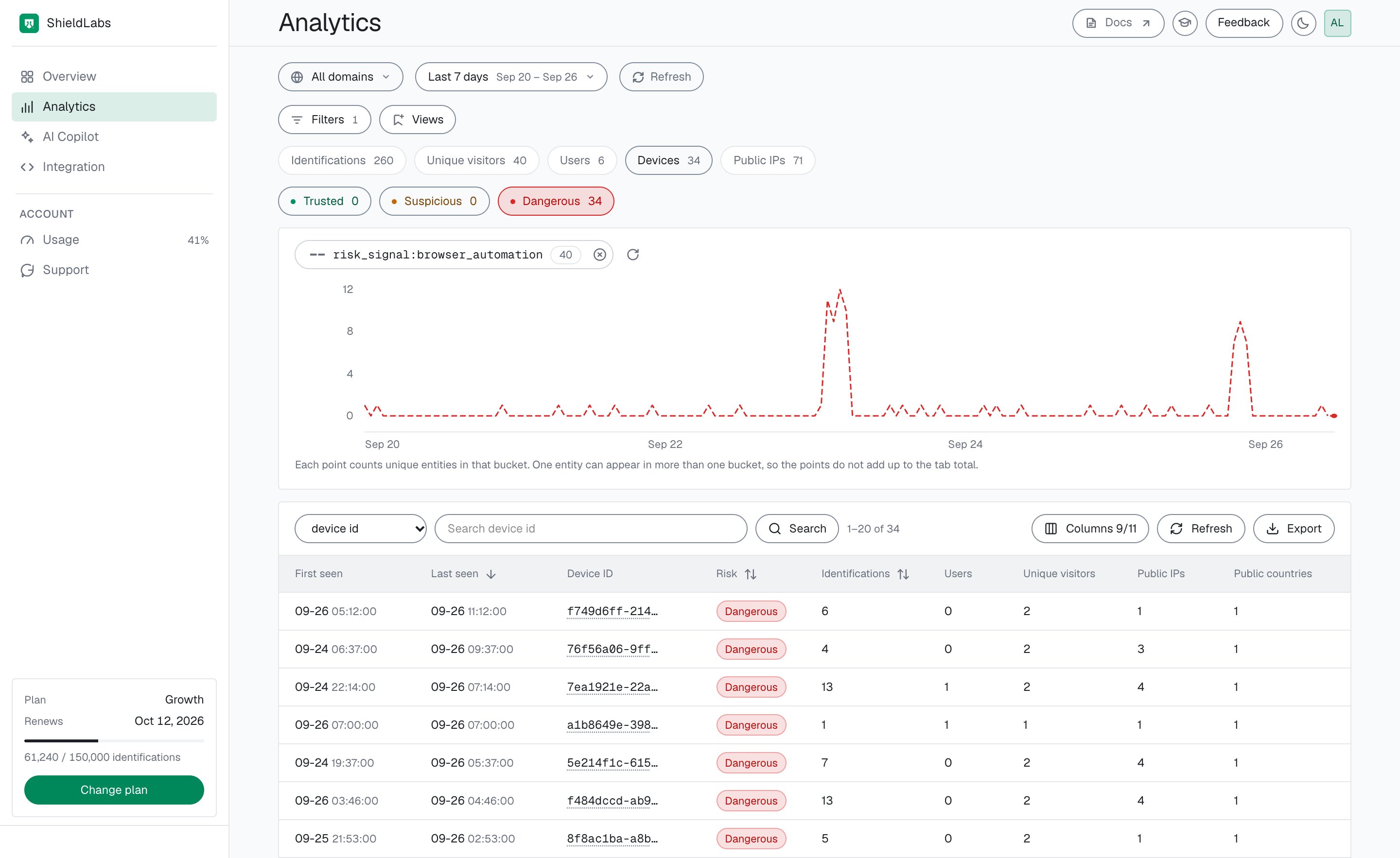
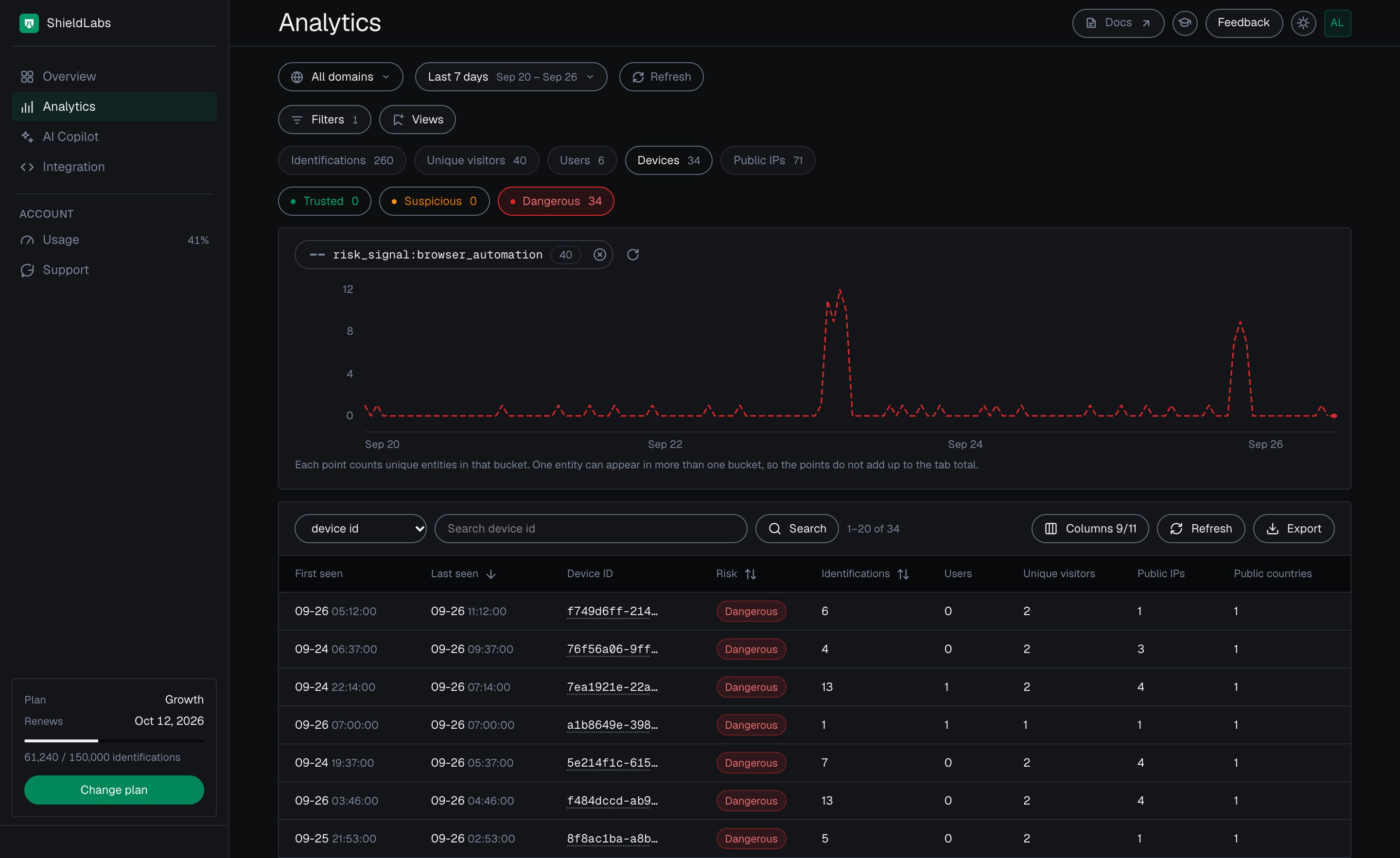
To see the devices that ran automated checkouts in a period, open Analytics in the analytics dashboard, pick the Devices tab, filter Risk signals by Browser Automation and turn on the Dangerous band.
Devices with automated sessions in the period, in the analytics dashboard.
5
Corroborate the run with High-Risk Events
The decision above is per attempt. The shape that confirms a card-testing operation spans many attempts: many accounts driven by one person. ShieldLabs detects it directly as Multi-accounting: several accounts run by one person, linked through the devices and network they share, at Medium or High confidence. High-Risk Events are available in the analytics dashboard, the API and webhooks, and need the hashed User HID, so pass it with forceCheckAuthenticatedUser wherever the buyer has an account. The Risk Score and risk signals of the identification remain the input at each payment attempt.When a Multi-accounting event arrives for a user through the API or webhooks, or when you review it in the analytics dashboard, act on that user and the accounts linked to it. You choose the action for each case, for example holding their next payment for review. To add your own count at the attempt, read the accounts behind the device from the History API:
Accounts behind this device
// Inside /api/pay, after the guard and before decideOnSignals(risk, res).// accountsBehindDevice is a shared helper: the distinct accounts seen on one// device in its newest 100 identifications. Guest checks carry "anonymous",// which is not an account.// A failed History read is unverified: hold the payment for review.const accounts = await accountsBehindDevice(risk.device_id).catch(() => null);if (accounts === null) { return res.status(202).json({ status: 'review', reason: 'history_unavailable' });}if (accounts > YOUR_ACCOUNTS_PER_DEVICE_LIMIT) { return res.status(202).json({ status: 'review', reason: 'many_accounts_on_device' });}
History reads on account.shieldlabs.ai and webhook delivery never count against your included identifications. Multi-accounting events reach you through the API, webhooks and the analytics dashboard, alongside this per-device count.
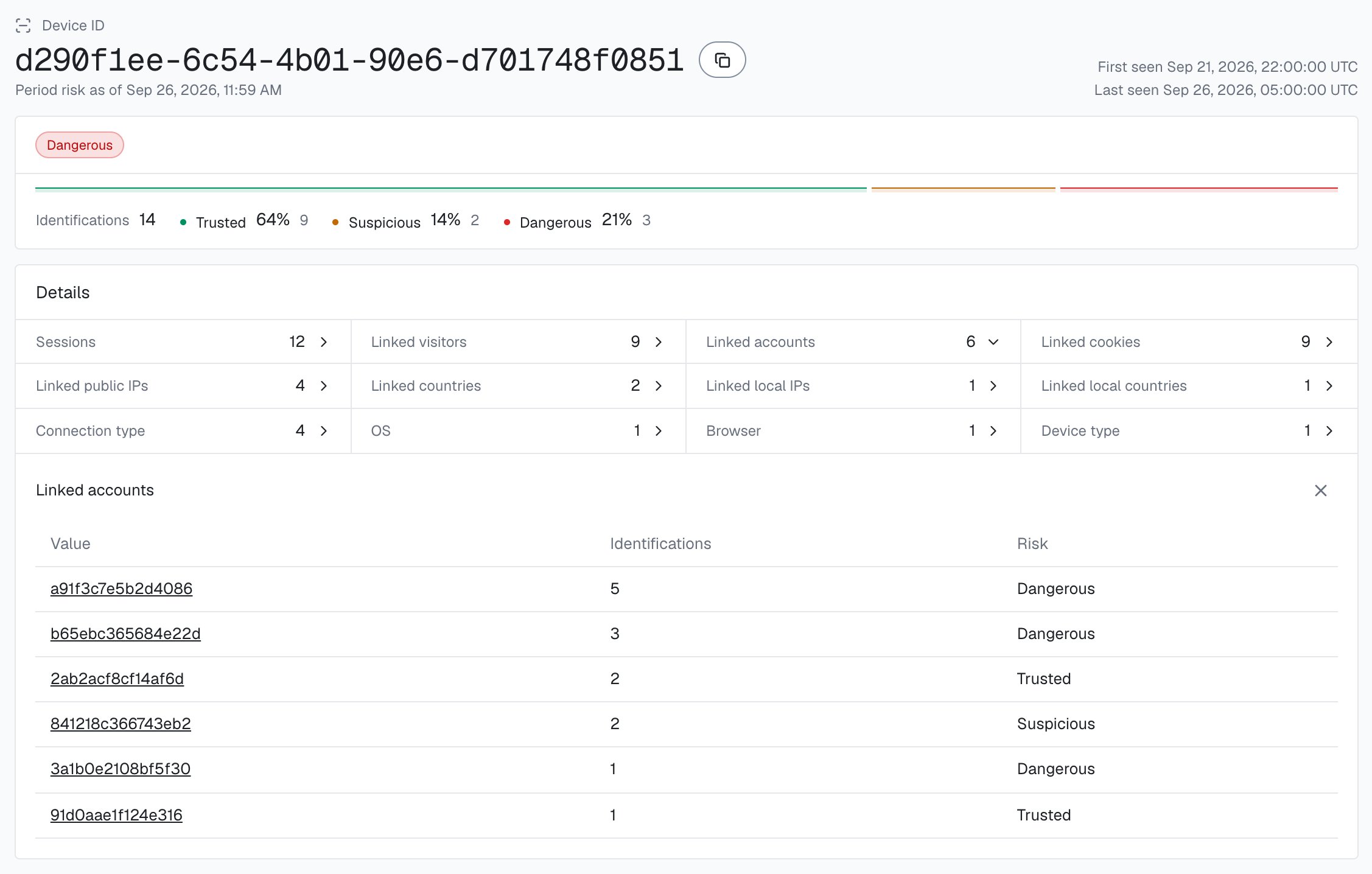
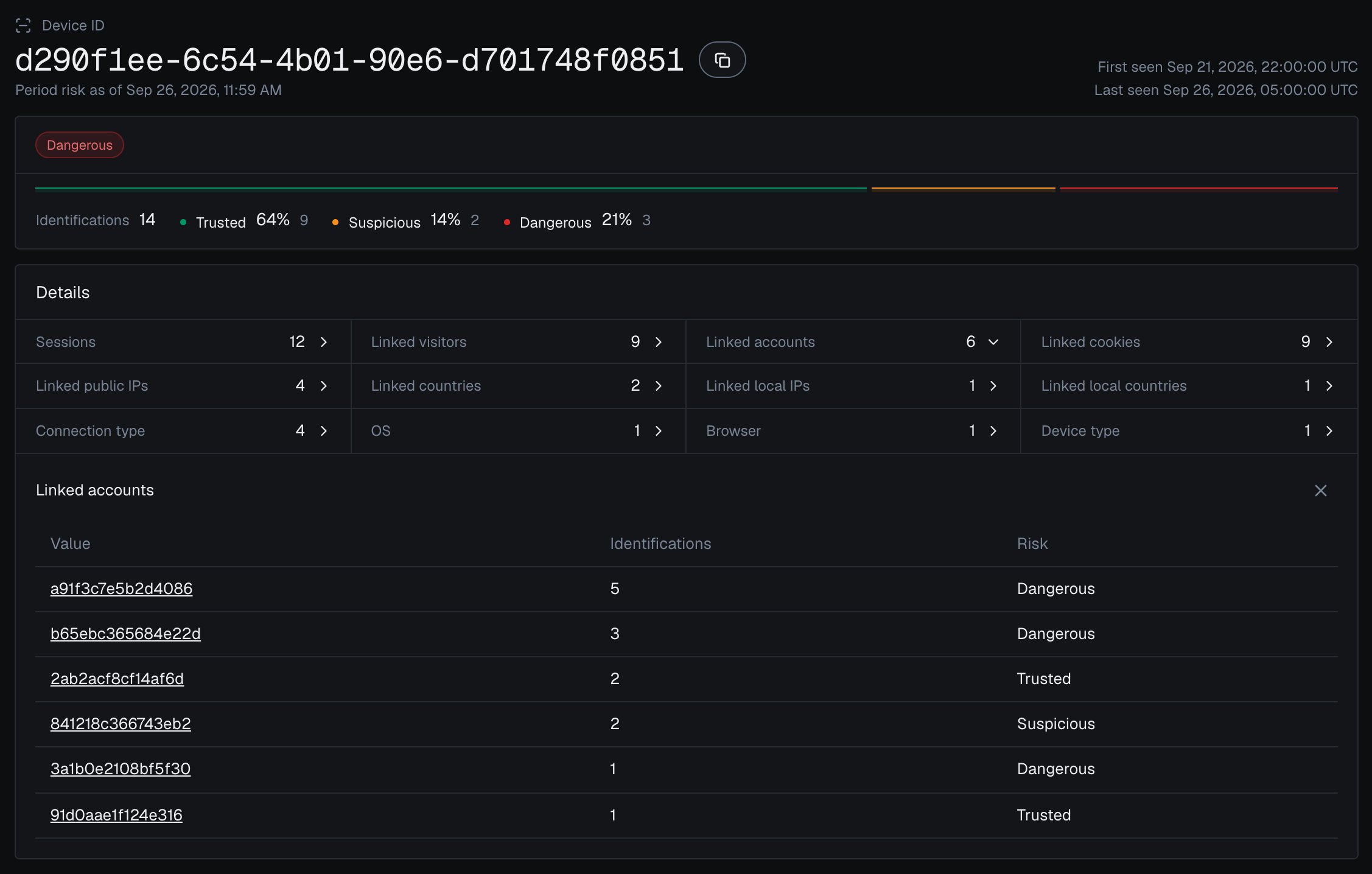
In the analytics dashboard, a device card lists Linked accounts: every account seen on that Device ID, each with the band of its identifications on that device: the same view as the count above. To build the watchlist, open Analytics, pick the Users tab and filter by High-Risk Events.
One Device ID in the analytics dashboard, with every account linked to it.
Confirm the Device ID holds before you wire your attempt limit to live charges. Run one checkout, note the device_id from the webhook, then repeat it in an incognito window and after clearing cookies: the cookie_id and visitor_id change each time, but the device_id stays the same, so three “fresh” tries from one tester increment one counter, not three. A second browser is a new Device ID; the Local IP counter is what ties it to the same network. Then repeat through a VPN or proxy and watch signals gain a vpn or proxy entry, the same masking your friction rule keys on.
Card testing is the front edge of payment fraud at checkout; the same fresh-check pattern and the same device_id carry through from validating a stolen card to pushing the real purchase. And because a tester farming many throwaway accounts is the same device behind each one, the device link that powers your attempt counter also surfaces one person running many accounts.
Acting on results
Turn the Risk Score and signals into allow, challenge, review, and hold logic in your app.
Risk signals
Every risk signal that can appear in signals, in plain language, with its weight.
The Risk Score
How the Risk Score from 0 to 100 is built, what signals carries, and the band definitions.
Payment fraud at checkout
The next step: read the buyer’s account and risk signals before you charge.