Learn how to detect and prevent new account fraud and fake signups by linking each new account to the device and the accounts behind it.
Account farms and fake signups share one tell on the wire: many accounts created from the same device or the same network, often through a VPN, proxy, an anti-detect browser, or a cleared-cookie incognito session that tries to look new every time. ShieldLabs gives you five layers to catch this at registration, and you choose the action for each case at your signup endpoint.
New account fraud, also called fake signup fraud, is the mass creation of bogus or duplicate accounts by one person to abuse signup-bound perks (free trials, promos, referral payouts) or to seed downstream abuse. The accounts look distinct on the surface but trace back to a small number of real devices or networks.
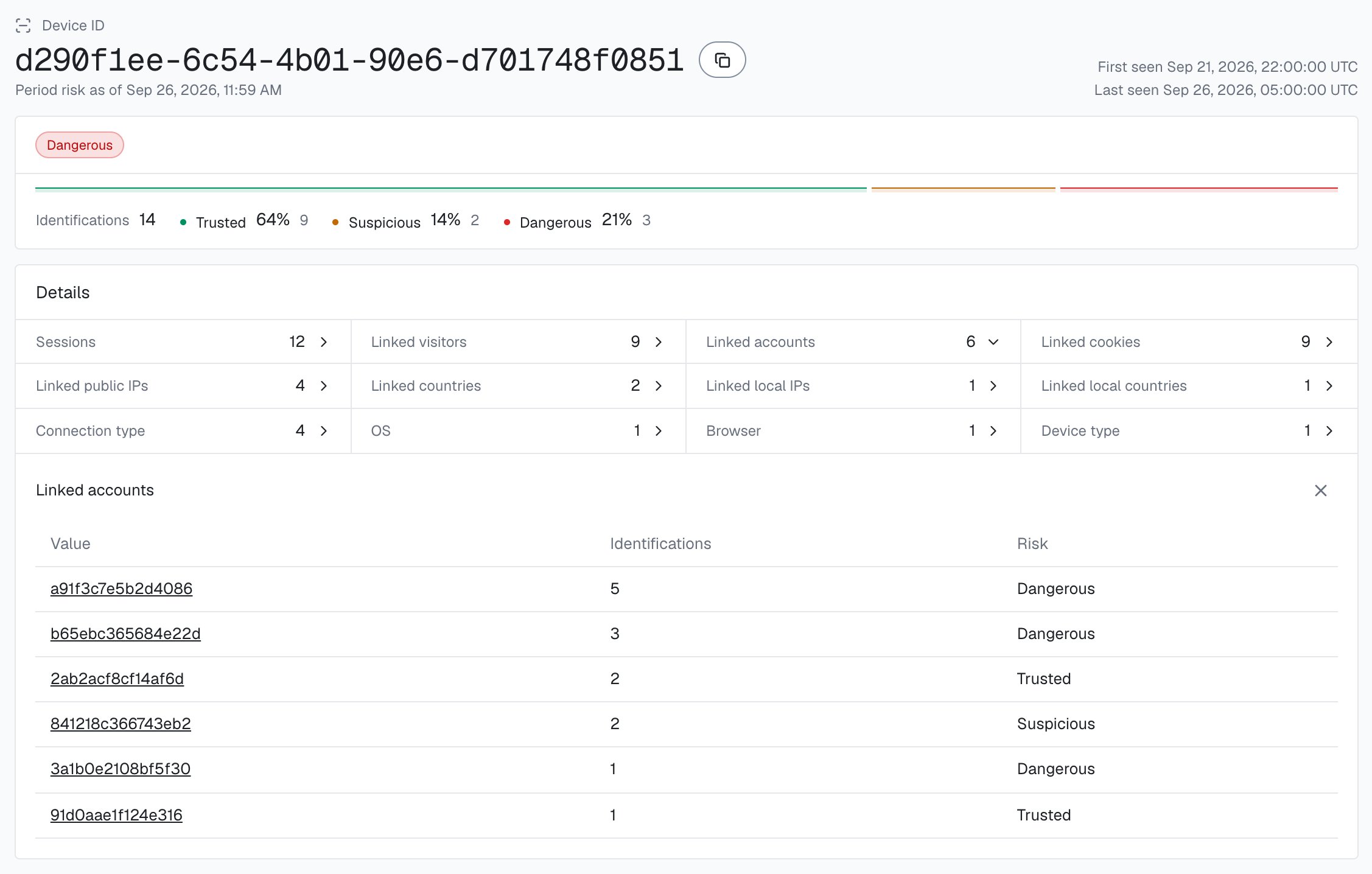
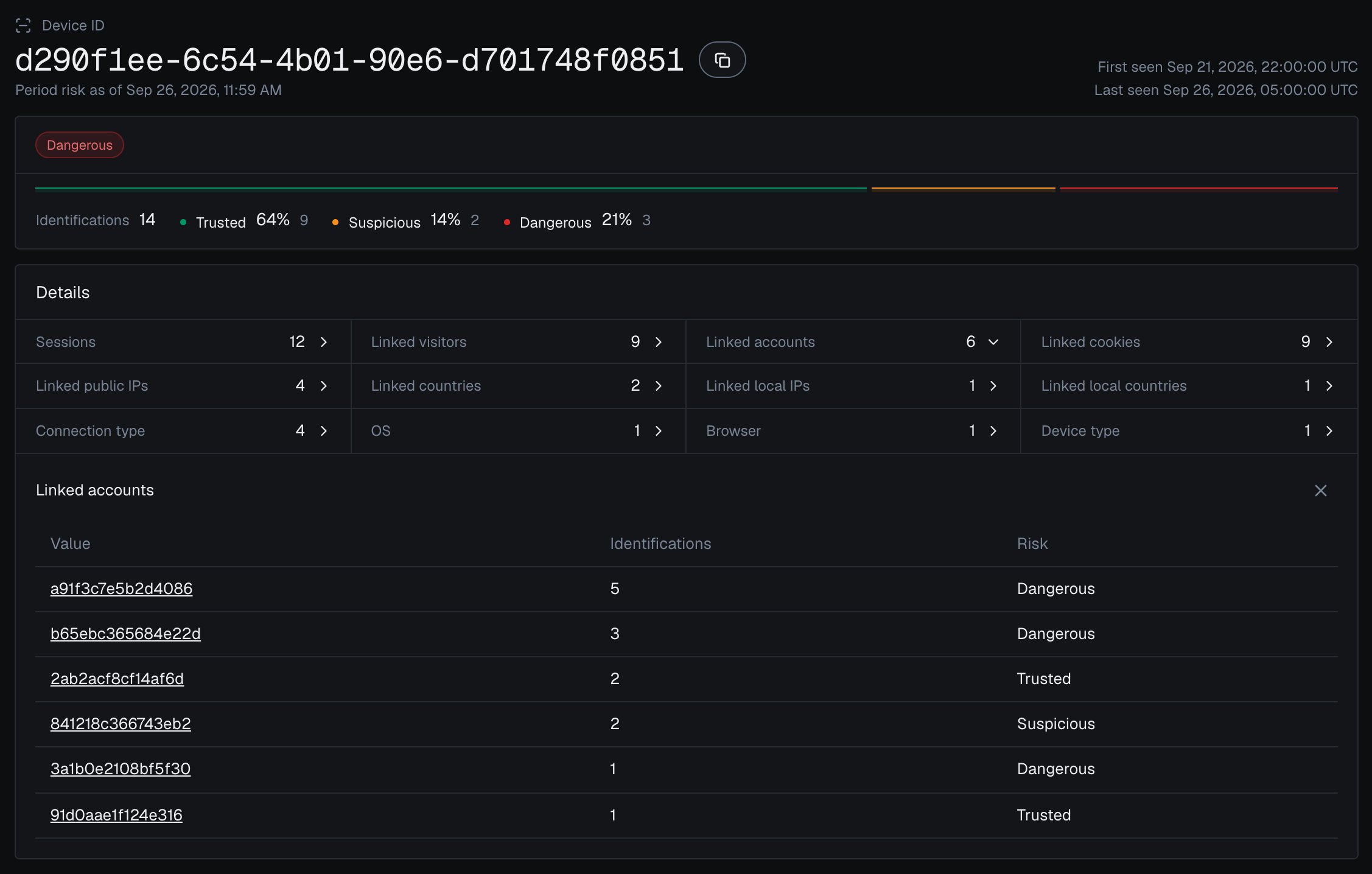
”Are the accounts on this device run by one person?”
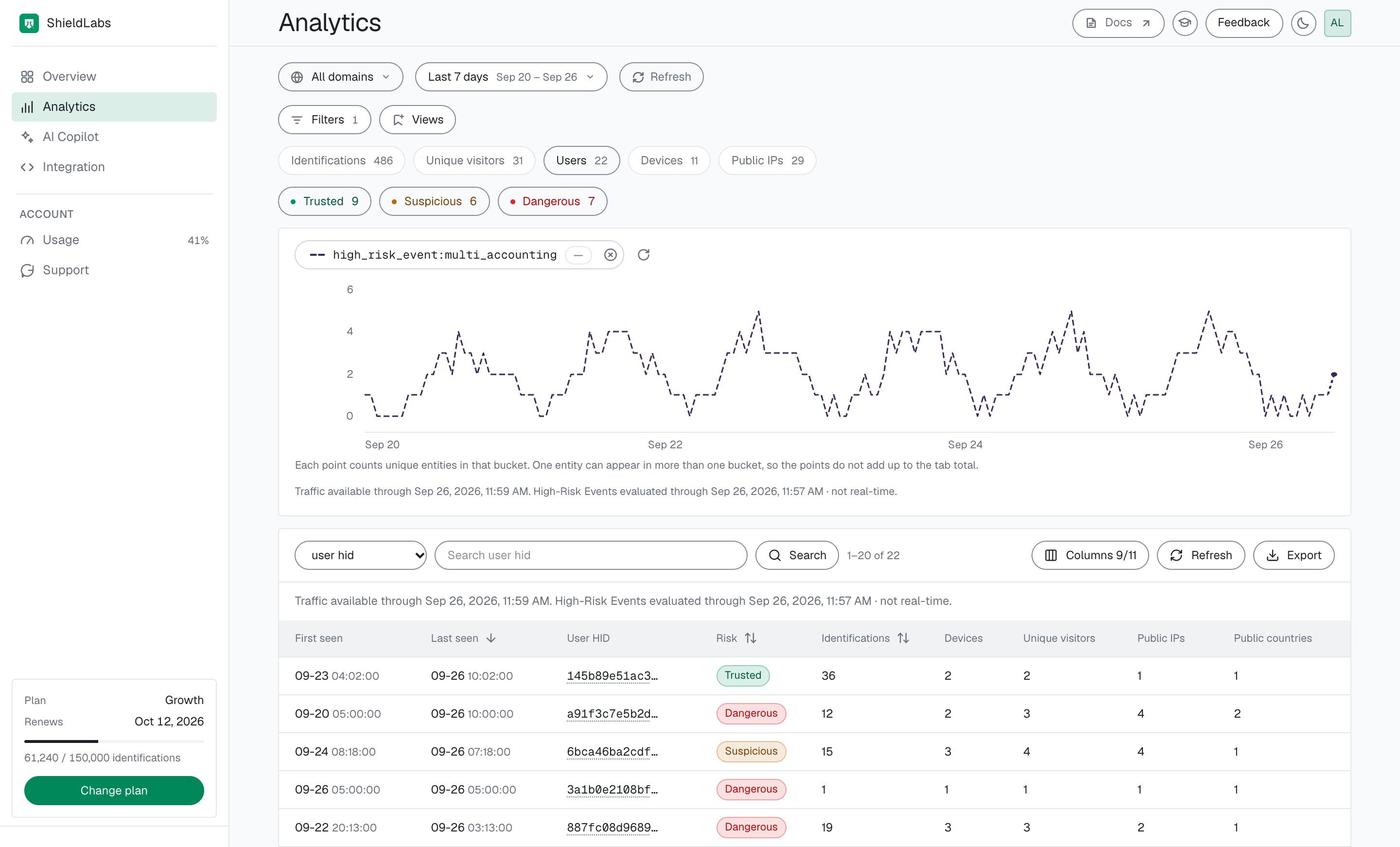
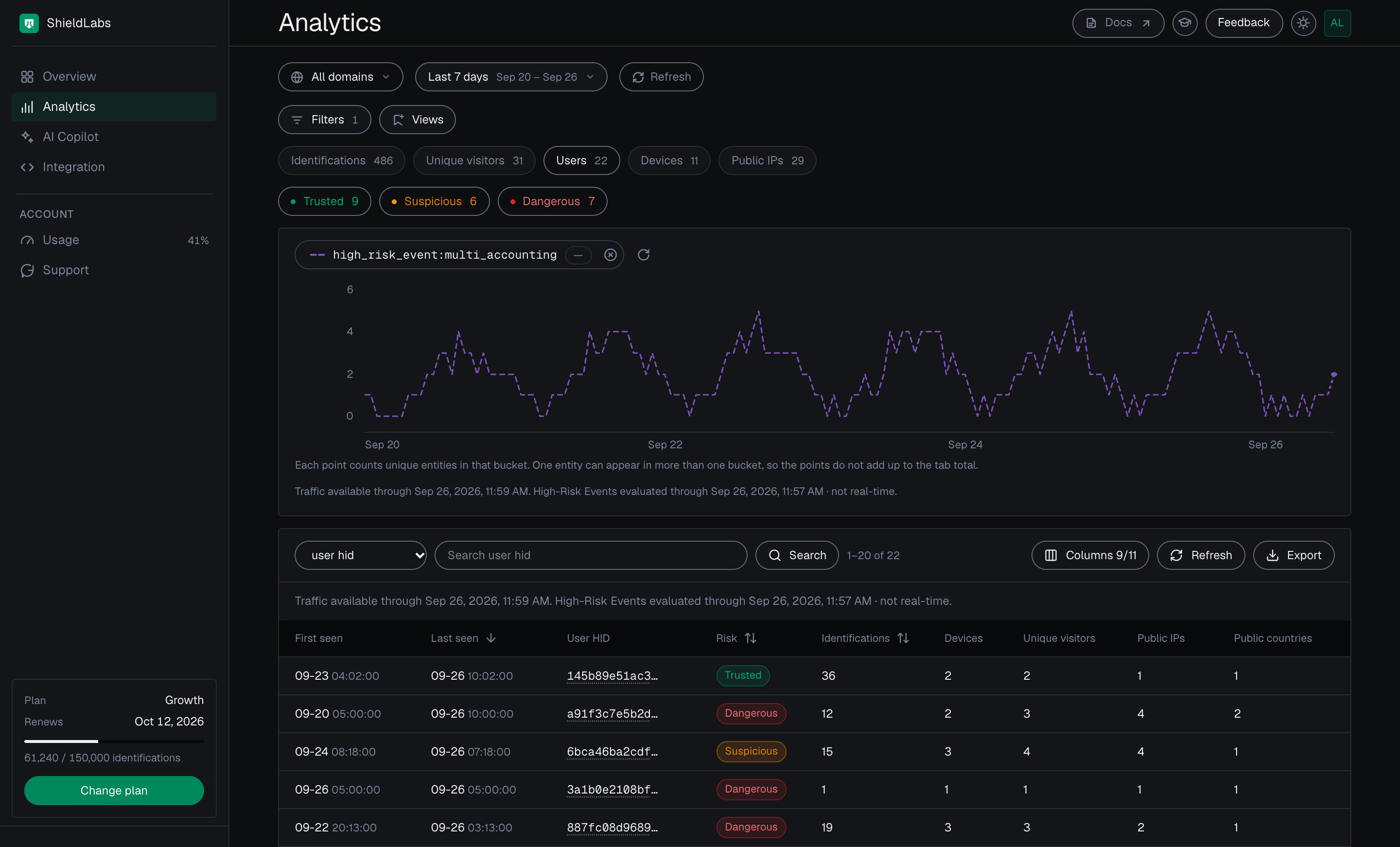
Multi-accounting on those users, in the analytics dashboard, the API and webhooks
When detected
Identification is the anchor the others ride on: the naive keys reset on demand (a fresh cookie_id and visitor_id per cleared-cookie or incognito session, and a new IP each time the VPN exit node changes), but the server-derived Device ID does not, so it collapses those “new” signups back to one device. The Risk Score flags the masked or automated signup the moment it happens, so you can stop it, and the Multi-accounting event catches the slow farm that spreads account creation over hours or days, each signup looking clean on its own. You want all five.
Read a high Risk Score (0-100) together with its named risk signals and the user’s history. A real customer on a corporate VPN can reach the Suspicious band; the signals show why, and you choose the action for each case.
The rule to apply: read the Risk Score and named signals of the signup’s identification at your signup endpoint, before you activate the account. A Dangerous-band score (60-100) requires a second factor, a Suspicious-band score (30-59) holds the account for email verification, a Trusted score (0-29) passes through. Layer the account view on top: when the device behind the signup is already linked to other accounts, or to a user with a Multi-accounting event, escalate one step. The outcome is that the obviously masked signup, and the farm spreading creation across sessions, both meet friction while a real first-time customer signs up without friction.Two signal sources drive that decision:
Per identification (the Risk Score): the Risk Score (0-100) and the risk signals behind it: bot and automation signals (Browser Automation, JavaScript Disabled), masking signals (VPN, Proxy, Tor, Privacy Relay, Browser VPN/Proxy, Datacenter IP, Abuser Flag), consistency signals (OS Mismatch, Timezone Mismatch) and Anti-detect Browser. Each signal adds its weight: Browser Automation, JavaScript Disabled, Anti-detect Browser and OS Mismatch weigh 60 to 90, so one alone puts a signup in the Dangerous band, while most network signals are light (VPN 15, Privacy Relay 15, Proxy 10, Datacenter IP 10, Abuser Flag 10), so a VPN-only or Datacenter-only signup stays Trusted until they stack. Tor (99) is the exception and puts a signup in the Dangerous band on its own, and Browser VPN/Proxy (30) reaches the Suspicious band on its own. You map the Risk Score to a band and read each signal’s weight for context.
Across the account (High-Risk Events): ShieldLabs detects Multi-accounting on your users: several accounts run by one person, linked through the devices and network they share, each at Medium or High confidence. It links the farm that a single identification cannot show, and it is available in the analytics dashboard, the API and webhooks.
A scripted or headless farm raises Browser Automation or JavaScript Disabled on its signups (see Bots and automation), and the accounts it creates link together in the Multi-accounting event.
Start Free with 5,000 identifications, one time, no credit card, or log in. In the analytics dashboard, add the domain you want to protect under Integration > Domains, then open Integration > API keys and copy its keys with the copy button next to each. The Public Key loads the snippet in the browser. Keep the server credentials on your backend: the Private API Key reads the History API, and each webhook endpoint has its own whsec_… signing secret. See API keys and Integration.
2
Identify the signup as the form is filled in
Add the snippet to your signup page and call forceCheckAnonymous when the user starts filling the form (its first focus). It runs a fresh identification for this signup even if the visitor was checked on another page a moment ago; without force, a repeat check in the same visit within five minutes is skipped. onInitialized fires when the check starts, before the snippet has sent the identification, so do not navigate away inside it: store the request ID and let the form submit normally. The callback receives { status: "initialized", requestID } or { status: "not_initialized" }; requestID is the join key, not a Risk Score. The Risk Score arrives by webhook.
signup.html
<script type="module"> const mod = await import( 'https://cdn.shieldlabs.ai/snippet.js?publicKey=YOUR_PUBLIC_KEY' ); const form = document.getElementById('signup-form'); // onInitialized fires when the check starts, before the snippet sends it. // Start the fresh identification when the form comes into use, so it is sent // while the user fills the form, and let the form submit normally. const identify = () => { // The account does not exist yet. mod.forceCheckAnonymous({ onInitialized: (result) => { if (result.status === 'initialized') { document.getElementById('shieldlabs-request-id').value = result.requestID; } }, }); }; if (form.contains(document.activeElement)) identify(); // already focused (autofocus) else form.addEventListener('focusin', identify, { once: true });</script><form id="signup-form" method="POST" action="/api/signup"> <input type="hidden" id="shieldlabs-request-id" name="shieldlabsRequestId" /> <input type="email" name="email" placeholder="Email" /> <input type="password" name="password" placeholder="Password" /> <button type="submit">Create account</button></form>
3
Gate signup on the Risk Score
Receive the webhook, verify its HMAC, and cache the result keyed by request_id. At the signup endpoint, read the identification with the shared waitForScore helper (your webhook cache, with a short timeout, falling back to a History API read by request_id), then branch on its band. A missing identification is unverified, never clean.
api/signup.js
app.post('/api/signup', async (req, res) => { const { email, password, shieldlabsRequestId } = req.body; // 1. Your normal validation first. if (await emailExists(email)) { return res.status(409).json({ error: 'Email already in use' }); } // 2. The guard. A signup is a guest flow, so there is no User HID to match yet. const risk = await waitForScore(shieldlabsRequestId, 2000); if (!risk) { return res.status(200).json({ requireVerification: true, reason: 'no_identification' }); } if (risk.risk_score > 100 || risk.device_id === NIL_DEVICE) { // The 999 rate-limit marker, or no usable device signals: review, never allow. return res.status(200).json({ requireVerification: true, reason: 'unverified_device' }); } const flags = risk.detection_flags ?? {}; // booleans for quick branching // 3. Map the score to a band and choose the action. if (band(risk.risk_score) === 'Dangerous') { // Strong risk signals. Require email + a second factor. return res.status(200).json({ requireVerification: true, reason: 'extra_verification' }); } if (band(risk.risk_score) === 'Suspicious') { // Email-verify before activating. return createPendingAccount(email, password, res); } // Trusted: create the account normally. return createAccount(email, password, res);});
Branch on the band, on the signals[].name slugs (for example antidetect_browser, browser_automation, tor), or on the boolean detection_flags (vpn, proxy, tor, anti_detect_browser, browser_automation, javascript_disabled and more). Slugs are stable. A slug can repeat with a partial weight when an earlier verdict is carried forward, so test for presence rather than counting entries.Read the network behind the mask. The webhook carries two IP objects. public_ip is the public address and its country, which a VPN or proxy can put anywhere. local_ip is the Local IP: the address the browser itself reports, which can differ from the public IP behind a VPN or proxy and can expose the network behind the mask. local_ip.ip is empty when the Local IP was not captured. detection_flags.ip_mismatch is true whenever the two are different addresses. It is informational, adds nothing to the Risk Score and can be ordinary on mobile networks, so compare local_ip.country with public_ip.country rather than branching on the flag alone. For a farm rotating fresh public IPs, a local_ip.ip shared across accounts is often the durable network tell.
4
Catch the farm with Multi-accounting
A single masked signup is easy to score. The harder problem is the farm that creates 50 accounts over a week, each one clean in isolation. ShieldLabs detects this as the Multi-accountingHigh-Risk Event on those users: several accounts run by one person, linked through the devices and network they share, at Medium or High confidence. Your signup handler can still count the accounts on a device live, as the code below shows.
One Device ID in the analytics dashboard, with every account linked to it.
The event is keyed on the account, so as soon as the new account exists, call checkAuthenticatedUser with its hashed User HID (on the first signed-in page, for example); every account the farm creates is then tied to the device behind it. Multi-accounting is detected out of the box, without building rules or training a fraud model. High-Risk Events are available in the analytics dashboard, the API and webhooks. When a Multi-accounting event arrives for a user through the API or webhooks, or when you review it in the analytics dashboard, act on the account: add the User HID, with the devices and local IPs linked to it, to a watchlist in your datastore, and at the signup check the incoming device_id against it. You choose the action for each case. The History API returns every device an account has used, by user_hid. The acting guide gives a starting point for each event.
Users with a Multi-accounting event in the analytics dashboard.
You can also reconstruct a device’s accounts live: read the History API by device_id. The response is { data, total }; each element of data is one identification (newest first) carrying the user_hid it was made for, so distinct user_hid values on one device_id are distinct accounts behind that device. The shared accountsBehindDevice helper counts them and leaves out "anonymous", which is not an account.
Gate signup on the accounts behind the device
// Devices linked to users with a Multi-accounting event, recorded when it arrives// through the API or webhooks or when you review it in the analytics dashboard// (your own store), plus a live account count per device.const watchedDevices = await loadWatchedDeviceIds();async function deviceIsKnownFarm(deviceId) { if (watchedDevices.has(deviceId)) return true; const accounts = await accountsBehindDevice(deviceId).catch(() => null); if (accounts === null) return true; // a failed History read is unverified: verify the signup return accounts >= YOUR_ACCOUNT_LIMIT;}app.post('/api/signup', async (req, res) => { // ... validation, the guard and the Risk Score check above ... if (await deviceIsKnownFarm(risk.device_id)) { return res.status(200).json({ requireVerification: true, reason: 'device_linked_to_many_accounts', }); } return createAccount(email, password, res);});
History reads on account.shieldlabs.ai and webhook delivery are free. For high-volume signup flows, rely on your Multi-accounting watchlist and keep live History reads for borderline signups.
5
Tune to your product
Start in a logging-only mode, watch how your real signups distribute across the bands and how many accounts your devices carry, then raise friction where the data justifies it.
Reproduce a farm signup before you trust the gate. Load your signup page, complete it once, and note the device_id from the webhook. Then clear cookies (or open a new incognito window, or rotate your IP through a VPN) and sign up again: the cookie_id and visitor_id change each time, but the same device_id comes back. Then, without clearing cookies, sign in to three test accounts from the same browser, passing a different User HID for each, and check that their identifications carry the same device_id; a second browser gets its own Device ID. Three accounts on one visitor reach the default Multi-accounting threshold; look for the event on those users in the analytics dashboard, the API or webhooks.
The three bands are defined in Risk Scoring, and the per-band action playbook lives in Acting on results. Mapped to a signup gate:
Risk Score band
Suggested signup action
Trusted (0-29)
Create the account, log the identification
Suspicious (30-59)
Require email verification before activating
Dangerous (60-100)
Require a second factor, or reject and route to support
No identification for the signup, or an all-zero Device ID
Require verification before activating
You choose the action for each band. Layer the account view on top: if the device is linked to a user with a Multi-accounting event, escalate one step (a Suspicious signup on that device gets the Dangerous-band friction), and treat High confidence more firmly than Medium.
Next: Acting on results
The full per-band decision playbook, including signal-aware decisioning and how to combine the score with specific signals.