

What is ShieldLabs?
ShieldLabs is fraud detection and prevention with traffic quality scoring. It detects risky users under any masking and stops multi-accounting, account sharing, account takeover and impossible travel. ShieldLabs works with five identities, each with its own risk and its own links: users (your accounts, keyed by the hashed User HID you pass), devices, visitors, public IPs and local IPs. Every user, device, visitor and IP carries the worst risk band of its activity, and the four High-Risk Events are detected on your users, each at Medium or High confidence. Underneath sits the event layer: each identification, one check by the JavaScript snippet, collects 300+ device and network signals and returns a Risk Score from 0 to 100 with every risk signal named and weighted, delivered by webhook and readable through the History API. Integration takes five minutes. Detection works out of the box, without building rules or training a fraud model, with 99.9% identification accuracy and 99.9% risk signal detection accuracy (how we measure it).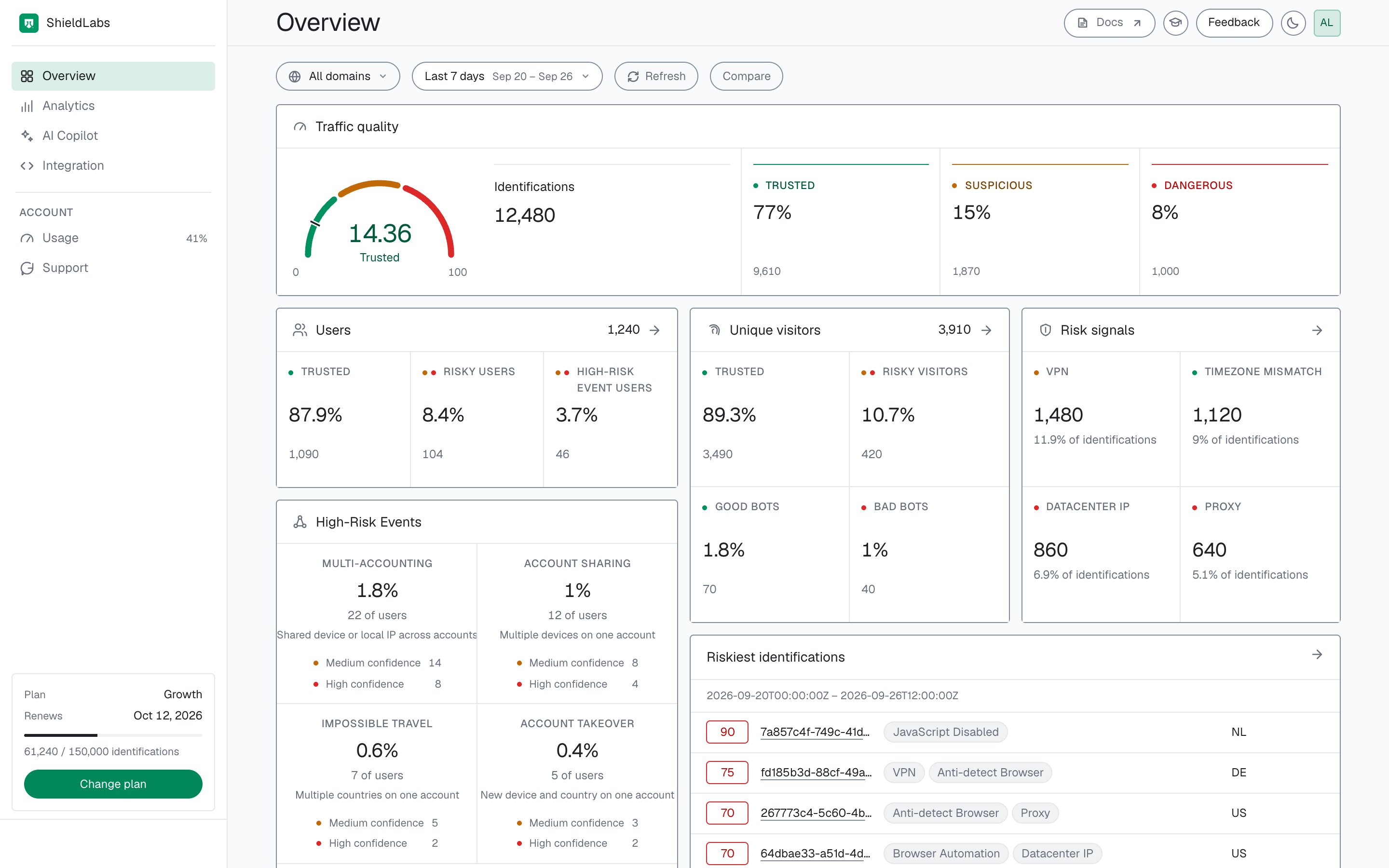
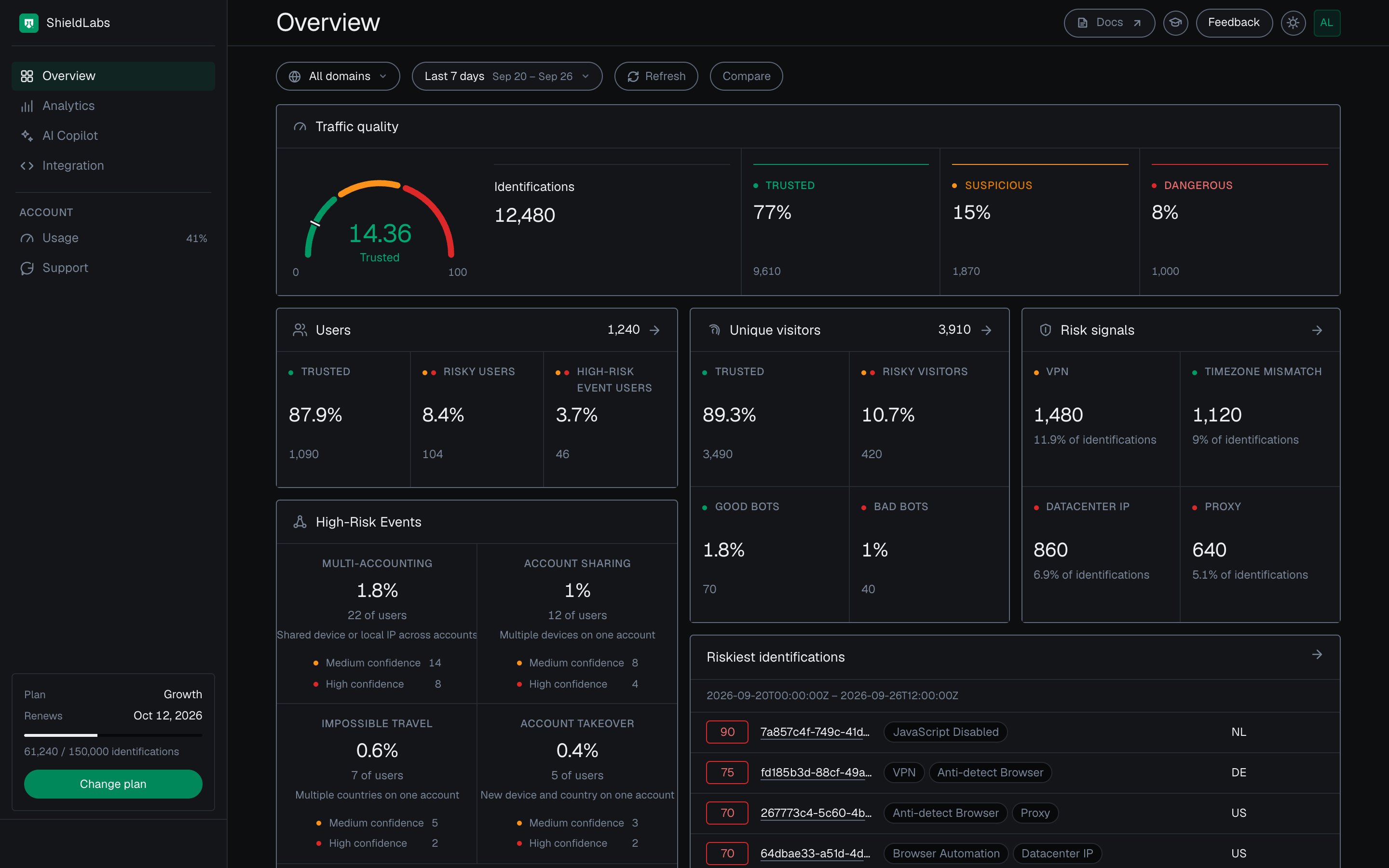
The Overview screen of the analytics dashboard: traffic quality, users, High-Risk Events and risk signals for the selected period.
How it works
1
Collect
Load the JavaScript snippet on your pages and pass a hashed User HID with
checkAuthenticatedUser on every signed-in page. Users, account-level risk and all four High-Risk Events are built on it. The snippet collects 300+ device and network signals in the background of the page.2
Identify and link
ShieldLabs derives the identifiers on the server and links each identification to its device, visitor and public IP, to its user when you pass a User HID, and to its local IP when the browser reports one.
3
Score and detect
Each identification gets a Risk Score from 0 to 100 with every risk signal named and weighted. Each user, device, visitor and IP carries the worst band of its identifications, and the four High-Risk Events are detected on your users at Medium or High confidence.
4
Act
The Risk Score and risk signals reach your backend by webhook about 300 milliseconds after the check and stay readable through the History API. High-Risk Events are available in the analytics dashboard, the API and webhooks; in the analytics dashboard they show on the Overview and on each user’s card. You choose the action for each case: allow, step up, review or block.
request_id, which ties the snippet call, the webhook and the History API record together.
The Device ID (for example d290f1ee-6c54-4b01-90e6-d701748f0851) is derived on the server, so it holds through cleared cookies, incognito mode and IP changes. The Visitor ID (for example a1b2c3d4-e5f6-4a7b-8c9d-0e1f2a3b4c5d) is one device plus one cookie. That stability links each user to the devices, visitors and IP addresses they use, even under masking. It works both ways: a returning user on a known device is recognized just as easily, so you can spare them repeated logins and extra checks.
Every Risk Score is explainable: the signals array names every risk signal that fired and the weight it added, so you always see why an identification scored the way it did.
Reading the Risk Score
The Risk Score falls into three bands: Trusted (0-29), Suspicious (30-59) and Dangerous (60-100). The API returns the number for each identification, and you map it to a band. Each user, device, visitor and IP carries the worst band of its identifications. Each band carries a recommended action, defined in full on Risk Scoring.Read a high Risk Score together with its named risk signals and the user’s history. A real customer on a corporate VPN can reach the Suspicious band; the signals show why, and you choose the action for each case. The per-band playbook shows what to do at each band.
Where each result appears
High-Risk Events, each at Medium or High confidence, are available in the analytics dashboard, the API and webhooks. The analytics dashboard section walks through each screen.
What ShieldLabs detects
- High-Risk Events: direct detection of Multi-accounting, Account sharing, Impossible travel and Account takeover on your users, out of the box. Each event carries Medium or High confidence, a separate axis from the Risk Score, and is available in the analytics dashboard, the API and webhooks.
- Users, devices, visitors and IPs: every identification is linked to its device, visitor and public IP, plus its user when you pass a User HID and its local IP when the browser reports one. Each of them carries its own risk band. The Device ID holds through cleared cookies, incognito mode and IP changes, and signed-in users are recognized by the hashed User HID you pass.
- Risk Signals: network and device intelligence that catches VPNs, proxies, Tor, datacenter IPs, anti-detect browsers and OS mismatches, plus bot and AI traffic detection that identifies bots, automated traffic and AI agents and separates bad bots from good ones. Ordinary IP blocklists miss many of the same cases.
- Risk Scoring: a Risk Score from 0 to 100 on every identification, with each risk signal named and weighted.
- Traffic Analytics: traffic quality scoring by source, channel, referrer and UTM campaign, so you rank each source by the risky traffic it sends and measure cost per real visitor, not per click.
Acting at the account level
Check the account, then the moment
At signup, login, checkout or a payout, read two things: the Risk Score of the identification happening now, and the account behind it. In code, read every identification of the user from the History API byuser_hid and take the worst band (skip the 999 rate-limit marker). Multi-accounting and account sharing are detected on your users out of the box, without building rules or training a fraud model. High-Risk Events are available in the analytics dashboard, the API and webhooks. When one arrives for a user through the API or webhooks, or when you review it in the analytics dashboard, act on the account; you choose the action for each case.
Compare the device with the account’s devices
Before a sensitive action, compare thedevice_id of the identification with the devices already linked to the user. A known device on a Trusted identification continues without extra checks. A new device, or a login over a VPN, proxy or anti-detect browser, earns a step-up such as a one-time code. Account takeover is detected on the user directly, at Medium or High confidence.
Act on the Risk Score and its risk signals
Read the band of the Risk Score together withsignals, which name each risk signal and the weight it added, and weigh them against how sensitive the action is. You choose the action for each case: allow, step up, send to review or block. A recommended policy for each band gives you a starting point.
Use cases
The approaches above power most fraud-prevention and traffic-quality work. Here are four common examples; the Use Case Tutorials cover the full set, grouped by area: accounts, promotions and rewards, payments and content, and traffic and experience.Reduce login friction
Built on the account’s known devices. On login, compare the Device ID of the identification with the devices already linked to the user. A known device with no risk signals signs in with no extra challenge. A new device, or a login over a VPN, proxy or anti-detect browser, gets a check. The identifier model covers what you compare.Prevent account sharing and takeover
Built on High-Risk Events. Account sharing and Account takeover are detected on the user directly, each at Medium or High confidence, and are available in the analytics dashboard, the API and webhooks. The Risk Score and risk signals of the identification remain the input at login and before a sensitive action: a takeover often arrives with risk signals such as a proxy or an anti-detect browser. When either event arrives for a user, choose the action by its confidence: at Medium, step up and verify with the real owner; at High, end the account’s other sessions or lock sensitive actions. Acting on results has a starting point for each.Stop multi-accounting at signup
Built on High-Risk Events. Multi-accounting catches several accounts run by one person, linked through the devices and network they share, at Medium or High confidence. At signup, read the Risk Score of the identification: a fresh account over an anti-detect browser or a proxy earns a step-up such as phone verification. When the Multi-accounting High-Risk Event arrives for the user through the API or webhooks, or you review it in the analytics dashboard, act on the account.Screen risky traffic
Built on the Risk Score and its risk signals. Every identification arrives with a Risk Score and the risk signals behind it: VPN, proxy, Tor, Privacy Relay, datacenter IPs, anti-detect browsers and browser automation among them. Score a checkout, a payout or a signup, read which risk signals fired insignals, and choose the action for each case. A real customer on a corporate VPN can reach the Suspicious band, so weigh the Risk Score against how sensitive the action is.
Built to stay accurate
Identification is split between the browser and the server. The snippet collects the signals on the page, and ShieldLabs derives the identifiers, detects the risk signals and computes the Risk Score on the server. That split is what keeps results steady as browsers change.- Resilient to browser privacy changes. Identifiers are derived on the server from many signals at once, so a cleared cookie leaves the Device ID intact.
- No permissions, no interruption. The snippet requests no permissions and shows no pop-ups. It runs asynchronously alongside page load, so visitors are never interrupted while they act.
- Degrades gracefully when a signal is unavailable. If a signal cannot be obtained, the snippet still completes the identification, without hanging the page.
- Hard to fake. 300+ device and network signals are collected together and cross-checked against each other, which exposes deep masking. Using an anti-detect browser is itself one of the risk signals ShieldLabs detects.
Next steps
Quickstart
Install the snippet, identify your first user and read a Risk Score in five minutes.
Where to integrate
Decide where to identify your users and how to act on the results.
High-Risk Events
Multi-accounting, Account sharing, Impossible travel and Account takeover, detected on your users.
Accounts and identifications
How the account behind many identifications and the identification in front of you work together.