

What is multi-accounting?
Multi-accounting is the practice of one individual creating and operating several accounts on a service that intends one account per person, usually to claim a per-customer reward more than once, evade a limit, or coordinate activity that should come from separate users. The accounts look independent on the surface but share underlying hardware or network signals.How ShieldLabs surfaces it
ShieldLabs derives a durable Device ID for every identification, from the browser environment rather than from storage, so clearing cookies, opening incognito or rotating IPs does not reset it. Every naive identifier a person can reset, they do reset: a cleared cookie mints a freshcookie_id and visitor_id, a VPN or proxy hands them a new public IP, an incognito window looks like a first-time visitor. Counting on any of those just counts the disguises; the Device ID holds steady underneath, so the account linking below rests on it.
Multi-accounting shows at three levels, so it uses all of them:
- Across accounts, the Multi-accounting High-Risk Event links the accounts a single identification cannot show: several accounts run by one person, linked through the devices and network they share. By default it fires from 3 accounts on one visitor (a visitor is one device plus one cookie), and the threshold is configurable. Multi-accounting is detected even after cookies are cleared, since the shared devices and network keep the accounts linked, even when each session uses a fresh cookie and a different public IP. ShieldLabs detects it on your users out of the box, at Medium or High confidence, and it is available in the analytics dashboard, the API and webhooks.
- On the account and the device, the History API returns every identification of one account by
user_hid(its devices, visitors, IP addresses and worst band) and every account seen on one device bydevice_id. The sharedaccountViewandaccountsBehindDevicehelpers read both. - Per identification, the Risk Score (0-100) and its risk signals tell you whether this one action is masked or automated. The signals that ride along with farming cover automation (Browser Automation, JavaScript Disabled), masking (VPN, Proxy, Tor, Privacy Relay, Browser VPN/Proxy, Datacenter IP, Abuser Flag), consistency (OS Mismatch, Timezone Mismatch) and Anti-detect Browser. Each can be innocent in isolation, so read them with the account’s history.
High-Risk Events are a separate axis from the Risk Score and its bands, detected on the user rather than on one identification, so a user can be Trusted on every identification and still be multi-accounting. Multi-accounting links accounts through the hashed User HID, so pass it with
checkAuthenticatedUser on every signed-in page. Detection works out of the box, without building rules or training a fraud model. See High-Risk Events.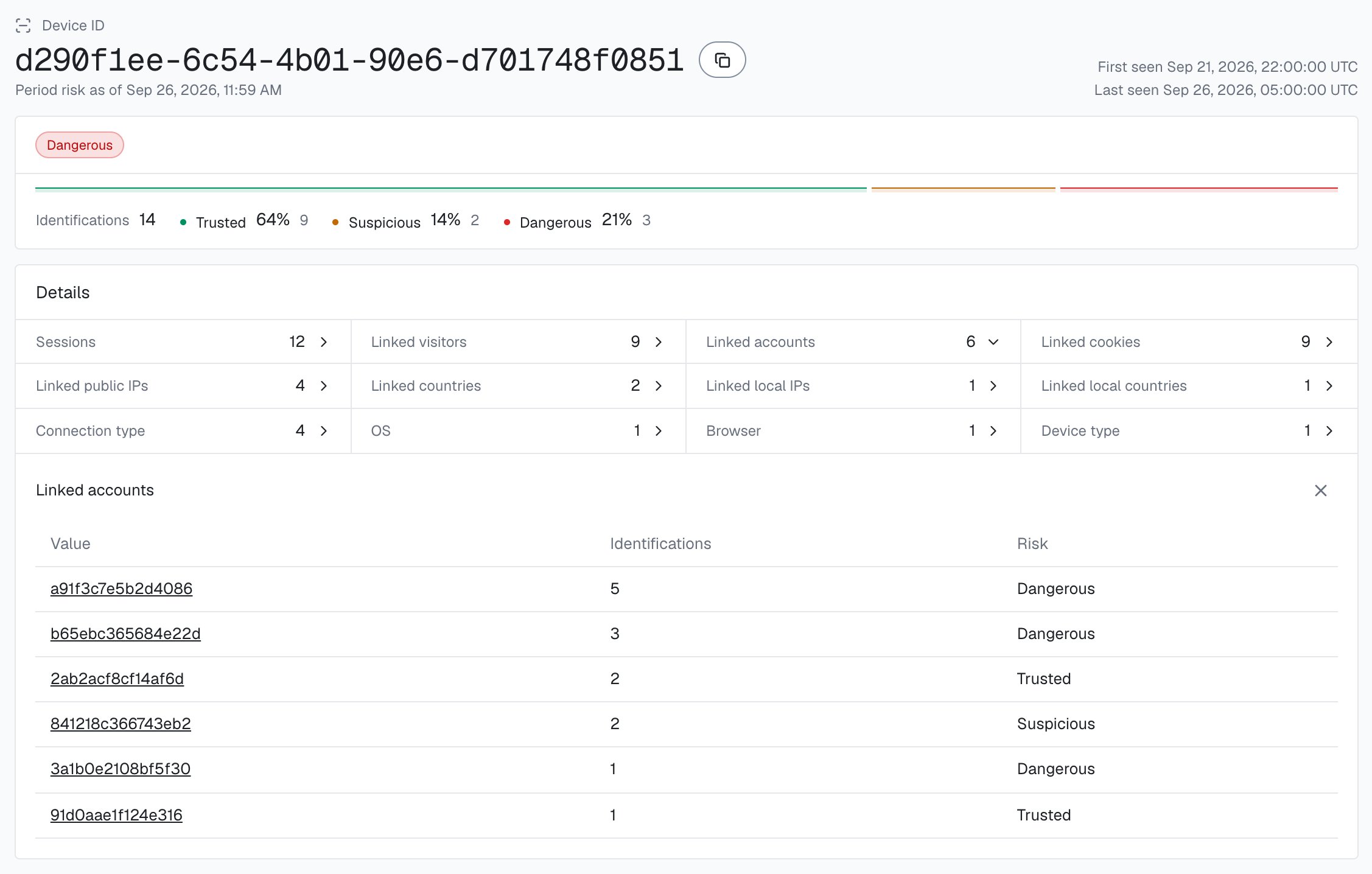
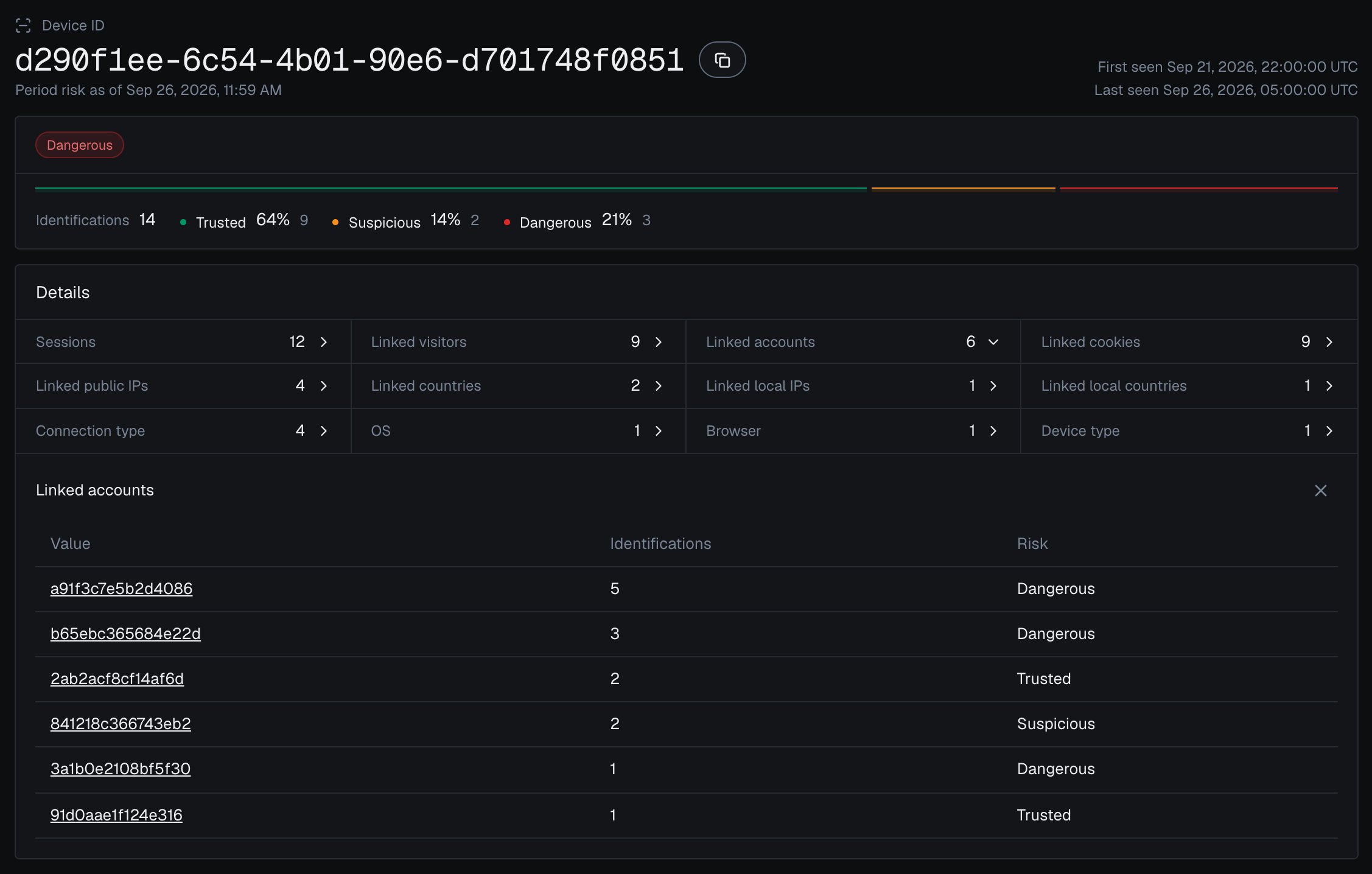
One Device ID in the analytics dashboard, with every account linked to it.
Prevent multi-accounting
Read three things on the action that matters (signup, the reward or trial claim, a withdrawal): the Risk Score of this identification, the accounts already seen on its Device ID (a live History read, as the steps below show), and whether the account or its device is on your Multi-accounting watchlist, where you record the event when it arrives for a user through the API or webhooks, or when you review it in the analytics dashboard. Hold the action for verification when the device carries several accounts or the account has the event, and escalate further at High confidence or when the identification is also masked. The outcome is that the “different” customers a person creates collapse back to the one device behind them. You choose the action for each case in your backend.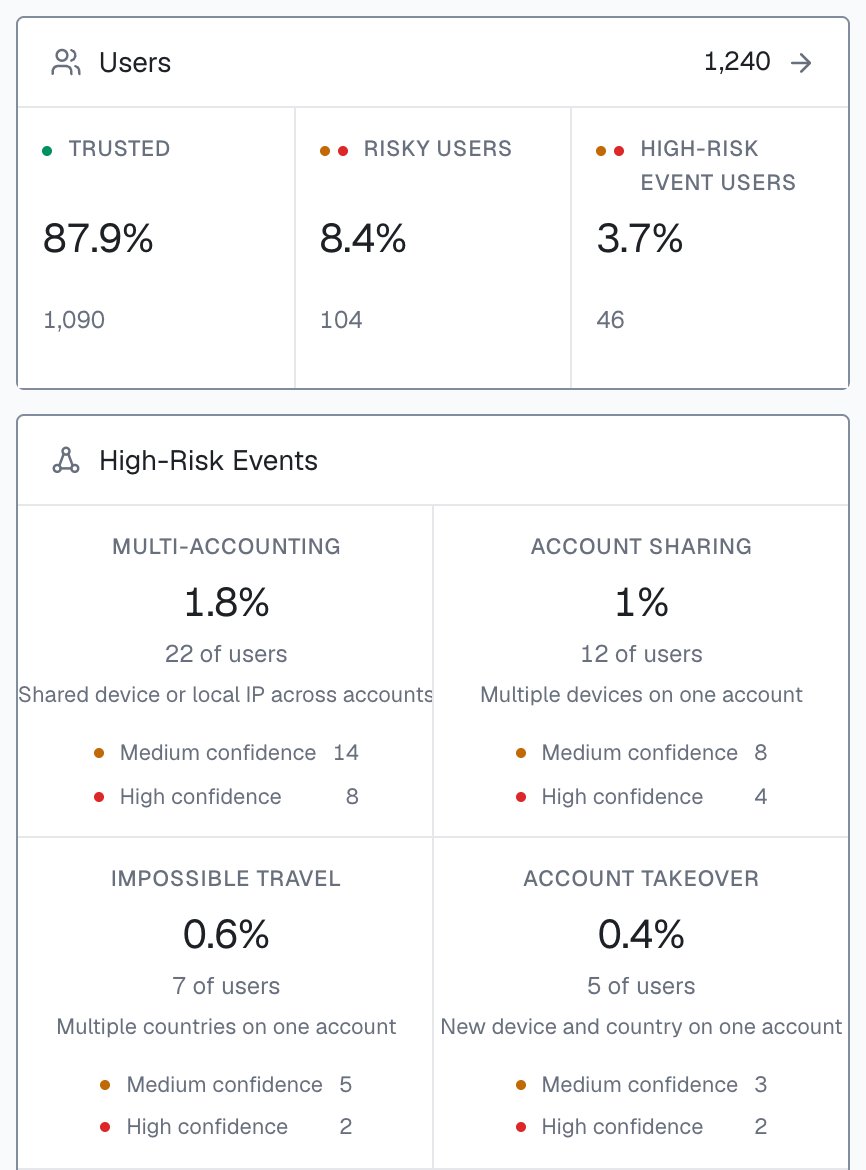
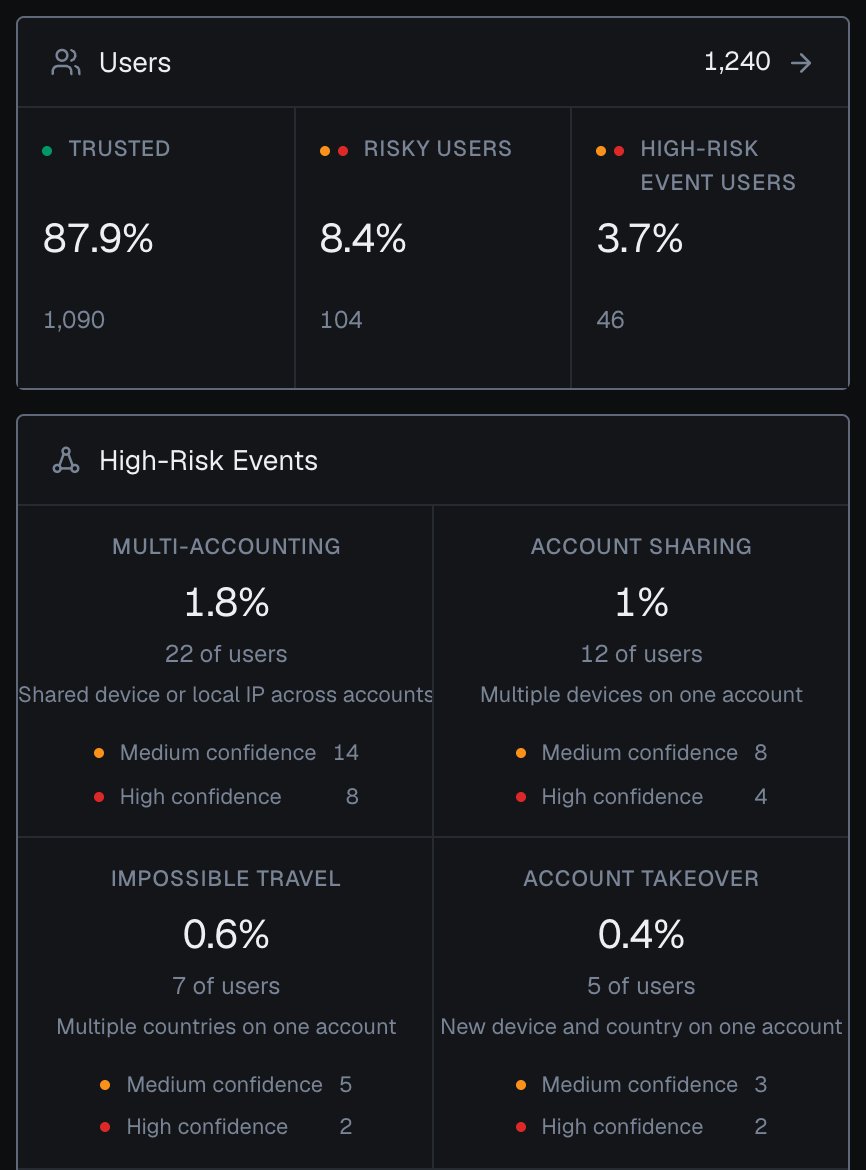
Users and High-Risk Events on the Overview screen of the analytics dashboard, counted for the users active in the selected period.
Build it
1
Create a ShieldLabs account and get your keys
Start Free with 5,000 identifications, one time, no credit card, or log in. In the analytics dashboard, add the domain you want to protect under Integration > Domains, then open Integration > API keys and copy its keys with the copy button next to each. The Public Key loads the snippet in the browser. Keep the server credentials on your backend: the Private API Key reads the History API, and each webhook endpoint has its own
whsec_… signing secret. See API keys and Integration.2
Identify the action
Add the snippet to your signed-in pages and pass the hashed User HID with
checkAuthenticatedUser on every one of them. At the actions where multi-accounting pays off (the reward or trial claim, a withdrawal, a vote), call forceCheckAuthenticatedUser in place of the plain check when the page with the action opens: it runs a fresh identification for the action even if the page before it was checked a moment ago, so you score the live session. onInitialized fires when the check starts, before the snippet has sent the identification, so do not navigate away inside it: store the request ID and let the form submit normally. Pass the account’s hashed id, never a raw email.account-action.html
3
Read the scored webhook on your server
ShieldLabs scores the identification and posts the result to your endpoint. The canonical fields are
request_id, device_id, visitor_id, user_hid, public_ip, local_ip, risk_score, signals, and detection_flags (full schema in the webhook reference). Verify X-Shield-Signature on the raw body, respond fast, and cache the result by request_id with the shared waitForScore helper. If a webhook is ever missed, that helper falls back to a History API read by request_id and maps it to the same field names.A multi-accounting-shaped webhook
4
Link accounts by the durable Device ID
The signals tell you a single action is masked; the Multi-accounting High-Risk Event is what links the accounts. At the action itself, count the distinct accounts that have appeared on one
device_id across History, check the account against your Multi-accounting watchlist, and use the Risk Score to escalate an action that is both masked and on an already-crowded device.api/account-action.js
Read the device's account history
A single History read returns at most 100 rows (the
limit cap), newest first, so a one-page read can undercount a heavily farmed device. For high-traffic devices, paginate with offset, or, cleaner, upsert the user_hid into a per-device set in your own datastore as each webhook arrives. The Multi-accounting High-Risk Event links accounts on the server and is available in the analytics dashboard, the API and webhooks; a watchlist built from it is the complement when you do not want to paginate. History reads through account.shieldlabs.ai are free.5
Catch what spans browsers: link on the local network
A person using several separate browsers shows up as several devices; the Multi-accounting High-Risk Event still links those accounts through the network they share. The webhook carries two IP objects.
public_ip is the public address and its country, which a VPN or proxy can put anywhere. local_ip is the Local IP: the address the browser itself reports, which can differ from the public IP behind a VPN or proxy and can expose the network behind the mask. detection_flags.ip_mismatch is true whenever the two are different addresses. It is informational, adds nothing to the Risk Score and can be ordinary on mobile networks, so compare local_ip.country with public_ip.country rather than branching on the flag alone. The durable link is the value of local_ip.ip, not the flag: when a farm rotates public IPs through a proxy pool, local_ip.ip often stays the same, so you can correlate accounts on it straight from the webhook.6
Tune to your product
A high Risk Score or a shared device calls for a closer look: a family on one shared laptop, a shared office network or a privacy browser can all produce these shapes. Decide on the account count, the score and your own context, start in a logging-only mode, and raise friction where the data justifies it.
Test it
You do not need a real farm to confirm the link holds. Create or sign in to one account in your normal browser and note thedevice_id on the webhook. Then clear cookies or open a private or incognito window, and act again as a different account. The cookie_id and visitor_id change every time, but the same device_id returns, and the distinct user_hid count on that device climbs with each run: the count step 4 gates on. A second browser gets its own device_id, which step 5 covers. Toggling a VPN or proxy adds the matching risk signals to the score without changing the Device ID.
Recommended starting policy
A guide, not a rule. Layer the conditions: real multi-accounting trips more than one, and friction should rise as they stack.Next
New Account Fraud
The create-time gate: join accounts to the Device ID at registration to thin the farm before it acts.
Promo Abuse
The reward-time gate: count accounts behind one device at redemption to stop bonus and free-trial farming.
Bonus Abuse
Repeat signup and deposit bonuses claimed through duplicate accounts on one device.
Loyalty Fraud
Points and tier rewards farmed across many linked accounts instead of genuine activity.