> ## Documentation Index
> Fetch the complete documentation index at: https://docs.shieldlabs.ai/llms.txt
> Use this file to discover all available pages before exploring further.
# Risk Signals
> Which risk signals ShieldLabs detects, from masking to bots and automation, and what each one means.
Risk signals are the named evidence behind every Risk Score: masking (VPN, proxy, Tor, Privacy Relay, datacenter IP, anti-detect browser), bots and automation, and mismatches between what a device reports and what its network shows. Each risk signal fires on one identification and stays tied to the user, device, visitor and IP address behind it, so you can read it per account as well as per call.
They come from network and device intelligence: on each identification ShieldLabs collects 300+ device and network signals and cross-checks them against each other, which exposes deep masking. The risk signals below are the named results of those checks.
When a risk signal fires, it becomes a stable slug in the webhook's `data.signals` array (`name` + `weight`) and, for most risk signals, a matching boolean in `data.detection_flags`. **Branch on `name`, `detection_flags` and the Risk Score band in code** to choose the action for each case: allow, challenge, review or block. [Risk Scoring](/features/risk-scoring) explains how the weights roll up.
## Network and masking
These risk signals show that the connection is relayed, tunneled or coming from infrastructure rather than an ordinary home or mobile network.
| Risk signal | What it indicates | Why it matters |
| --------------------- | ------------------------------------------------------------------------- | --------------------------------------------------------------------------------------------------------------------------------- |
| **Tor** | The connection exits through the Tor network. | The strongest single masking signal: ordinary users rarely use Tor, and it is built to hide where a connection comes from. |
| **VPN** | The connection runs through a VPN. | Common and often legitimate (corporate or privacy use), so a lighter signal on its own. |
| **Privacy Relay** | iCloud Private Relay or a similar relay. | Mainstream and privacy-driven, so it is surfaced on its own and replaces the other network weights instead of stacking with them. |
| **Proxy** | The connection is routed through a proxy. | A common masking tool; weigh it together with the datacenter and abuser risk signals. |
| **Browser VPN/Proxy** | An in-browser VPN or proxy extension is in use. | An extension-level mask, a deliberate choice to hide the connection. |
| **Datacenter IP** | The IP belongs to a datacenter or hosting network, not a residential ISP. | Ordinary people rarely browse from datacenters, so it points to automation or relayed traffic. |
| **Abuser Flag** | The IP address has a record of abuse in IP reputation data. | Prior abuse on the address, read together with the other network signals. |
## Consistency and mismatch
These risk signals show that two readings of the same identification disagree, which is what spoofed or relayed traffic leaves behind.
| Risk signal | What it indicates | Why it matters |
| --------------------- | ---------------------------------------------------------------------------------------------- | ----------------------------------------------------------------------------------------- |
| **OS Mismatch** | The operating system the browser reports is inconsistent with other evidence about the device. | A strong spoofing tell: an honest device does not contradict itself. |
| **Timezone Mismatch** | The device timezone does not match the IP geolocation. | A lighter location-spoofing tell; it can be innocent (travel), so weigh it with the rest. |
## Environment
These risk signals show that the runtime is spoofed, stripped, automated or could not be fully verified.
| Risk signal | What it indicates | Why it matters |
| ----------------------------------------------------------------- | ----------------------------------------------------------------------------------------------------------------- | ----------------------------------------------------------------------------------------------------------------------------- |
| **Anti-detect Browser** | Anti-detect or fingerprint-spoofing tooling is present. | A deliberate, sophisticated attempt to evade identification, and a strong tell. |
| **Anti-detect browser, proxy-routed** (`proxy_routed_antidetect`) | Anti-detect browser indicators seen through a proxy. It arrives in `signals` only, with no `detection_flags` key. | A second route to the same strong tell. It is added only when Anti-detect Browser has not already fired. |
| **Browser Automation** | The browser is driven by an automation framework rather than a person. | Automation-controlled browsers are near-certain non-human traffic, a strong tell that scores independently of the connection. |
| **JavaScript Disabled** | The browser lacks capabilities every ordinary browser has. | Marks a headless or automated client, one of the strongest tells. |
| **OS not Detected** | The operating system could not be derived from the available evidence. | A stripped or unusual environment; treated as precautionary. |
| **STUN not Checked** | The network check did not complete (`stun_not_checked`). | The identification's network path could not be fully verified. A later check can cancel it with `stun_late_correction` (-30). |
## Bots and automation
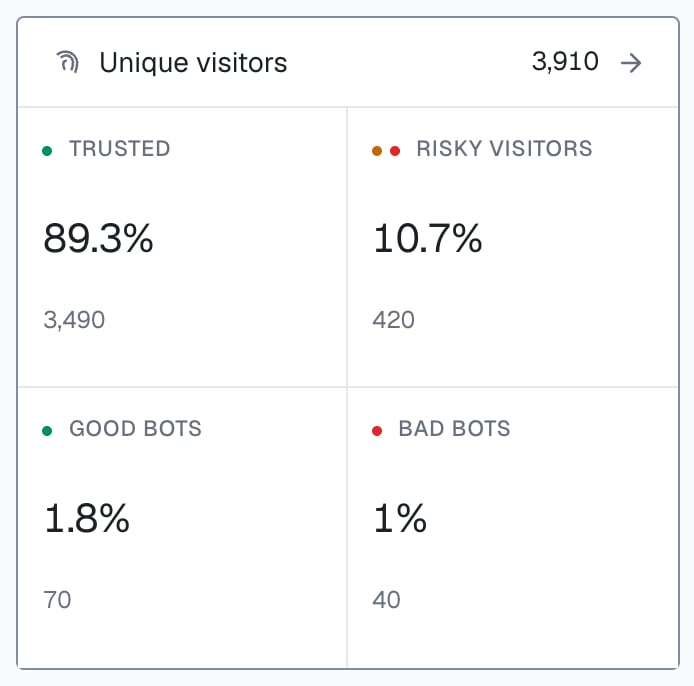
ShieldLabs detects bot and AI traffic: it identifies bots, automated traffic and AI agents, and separates bad bots from good ones. On the webhook, three keys carry it, and an AI agent that drives a browser arrives as automated traffic, on `browser_automation` or `javascript_disabled`:
| What ShieldLabs sees | Key | Weight | Effect on the Risk Score |
| ----------------------------------------------------- | ---------------------------- | -----: | --------------------------------------------------------------------------------- |
| A known search-engine crawler (good bot) | `detection_flags.search_bot` | 0 | The identification is set to 0 and filed under the **Search bot** traffic channel |
| A browser driven by an automation framework (bad bot) | `browser_automation` | 60 | Added |
| A headless or automated client | `javascript_disabled` | 90 | Added |
The analytics dashboard counts unique visitors with the first two: **Good bots** for search-engine crawlers and **Bad bots** for automated browsers, on the [Overview](/dashboard/overview) screen.
 ## Informational flags
These are detected and returned in `detection_flags` on the webhook with a weight of 0: they add nothing to the Risk Score and never appear in `signals`.
| Flag | What it indicates |
| ------------------------- | -------------------------------------------------------------------------------------------------------------------------------------------------------------------------------------------------------------------------------------------------------------------------------- |
| **Incognito** | The browser is in a private or incognito mode (`incognito`). |
| **IP Mismatch** | The public IP and the Local IP, the address the browser itself reports, are different addresses (`ip_mismatch`). This can be ordinary on mobile networks, so when location matters, compare `public_ip.country` with `local_ip.country` rather than branching on the flag alone. |
| **Suspicious Paid Click** | An identification on the Google Ads, Meta, TikTok, LinkedIn, X, Pinterest or Microsoft Ads channel, paid or organic, with a Risk Score of 60 or more (`suspicious_paid_click`). See [Traffic Quality](/use-case/traffic-quality). |
| **Search bot** | A known search-engine crawler such as Googlebot or Bingbot (`search_bot`). ShieldLabs sets the identification's Risk Score to 0 and files it under the **Search bot** [traffic channel](/features/traffic-analytics), so crawlers stay out of your risk figures. |
| **Check Incomplete** | One of the checks did not finish before the result was sent (`check_incomplete`). The identification is scored on what arrived. |
## Weights
Each risk signal adds a fixed weight, and the total is capped at 100. Some risk signals stand in for others instead of adding to them, for example Tor and Privacy Relay, which exclude the other network weights. [Risk Scoring](/features/risk-scoring) lists every weight and the [combination rules](/features/risk-scoring#how-signals-combine).
## Risk signals on users, devices, visitors and IPs
A risk signal fires on one identification, and the user, device, visitor and IP address of that identification carry it with them. To see which risk signals one account arrived with, read its identifications from the [History API](/api/server-api#read-every-identification-of-one-account) by `user_hid`: each row carries that identification's `score`, its `score_details` breakdown, the `is_*` flags and the `connection_type`. Search by `device_id`, `visitor_id` or `ip` the same way for a device, a visitor or an address. [Users, devices, visitors and IPs](/concepts/entities) explains how the identities link.
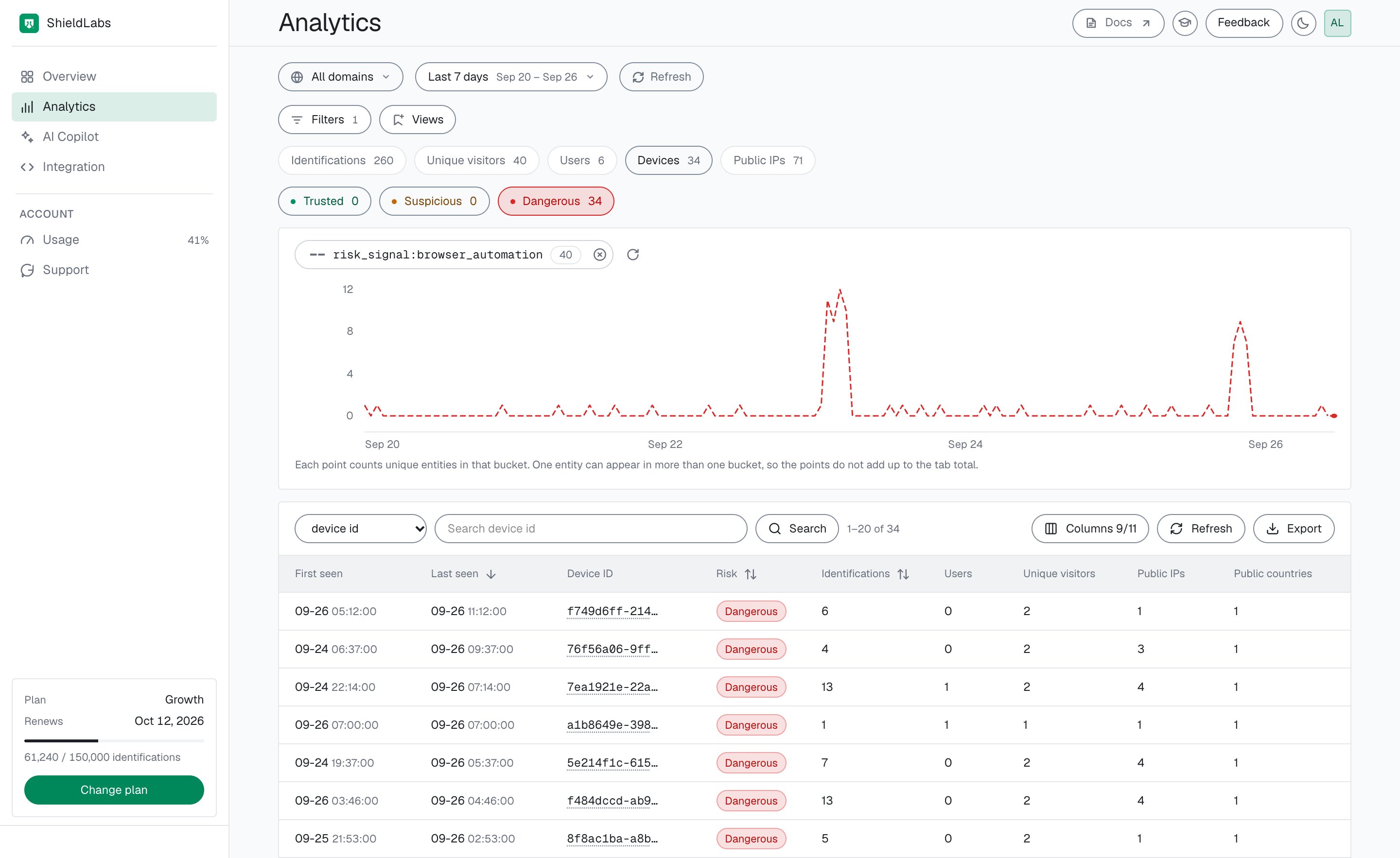
In the analytics dashboard, filter the **Users**, **Devices**, **Unique visitors** or **Public IPs** tab of [Analytics](/dashboard/analytics) by **Risk signals** to list the users, devices, visitors and IPs that arrived with a risk signal in the selected period, each with its band. A user's card shows its High-Risk Events, and each identification card names its risk signals with their weights.
## Informational flags
These are detected and returned in `detection_flags` on the webhook with a weight of 0: they add nothing to the Risk Score and never appear in `signals`.
| Flag | What it indicates |
| ------------------------- | -------------------------------------------------------------------------------------------------------------------------------------------------------------------------------------------------------------------------------------------------------------------------------- |
| **Incognito** | The browser is in a private or incognito mode (`incognito`). |
| **IP Mismatch** | The public IP and the Local IP, the address the browser itself reports, are different addresses (`ip_mismatch`). This can be ordinary on mobile networks, so when location matters, compare `public_ip.country` with `local_ip.country` rather than branching on the flag alone. |
| **Suspicious Paid Click** | An identification on the Google Ads, Meta, TikTok, LinkedIn, X, Pinterest or Microsoft Ads channel, paid or organic, with a Risk Score of 60 or more (`suspicious_paid_click`). See [Traffic Quality](/use-case/traffic-quality). |
| **Search bot** | A known search-engine crawler such as Googlebot or Bingbot (`search_bot`). ShieldLabs sets the identification's Risk Score to 0 and files it under the **Search bot** [traffic channel](/features/traffic-analytics), so crawlers stay out of your risk figures. |
| **Check Incomplete** | One of the checks did not finish before the result was sent (`check_incomplete`). The identification is scored on what arrived. |
## Weights
Each risk signal adds a fixed weight, and the total is capped at 100. Some risk signals stand in for others instead of adding to them, for example Tor and Privacy Relay, which exclude the other network weights. [Risk Scoring](/features/risk-scoring) lists every weight and the [combination rules](/features/risk-scoring#how-signals-combine).
## Risk signals on users, devices, visitors and IPs
A risk signal fires on one identification, and the user, device, visitor and IP address of that identification carry it with them. To see which risk signals one account arrived with, read its identifications from the [History API](/api/server-api#read-every-identification-of-one-account) by `user_hid`: each row carries that identification's `score`, its `score_details` breakdown, the `is_*` flags and the `connection_type`. Search by `device_id`, `visitor_id` or `ip` the same way for a device, a visitor or an address. [Users, devices, visitors and IPs](/concepts/entities) explains how the identities link.
In the analytics dashboard, filter the **Users**, **Devices**, **Unique visitors** or **Public IPs** tab of [Analytics](/dashboard/analytics) by **Risk signals** to list the users, devices, visitors and IPs that arrived with a risk signal in the selected period, each with its band. A user's card shows its High-Risk Events, and each identification card names its risk signals with their weights.
 ## Connection type
Every identification also carries one **connection type**, the headline label for how it reaches you: `connection_type` on the [webhook](/api/webhooks) and on each [History API](/api/server-api) row.
`connection_type` is one of: **Direct**, **Mobile**, **VPN**, **Proxy**, **Tor**, **Privacy Relay**, **Browser VPN/Proxy** or **Unknown** (when the type could not be resolved). The analytics dashboard breaks traffic down by connection type.
| Connection type | What it indicates | Webhook and API (`connection_type`) |
| --------------------- | ----------------------------------------------------------------------------------- | ----------------------------------- |
| **Direct** | Ordinary connection, no masking signal. Home Wi-Fi without a VPN is typically this. | `direct` |
| **Mobile** | Cellular carrier, including tethering or hotspot. | `mobile` |
| **VPN** | Traffic runs through a system-wide VPN. | `vpn` |
| **Proxy** | Connection routed through a proxy. | `proxy` |
| **Tor** | Connection exits through the Tor network. | `tor` |
| **Privacy Relay** | Relayed through iCloud Private Relay. | `privacy_relay` |
| **Browser VPN/Proxy** | In-browser VPN or proxy *extension* (not a system VPN). | `browser_vpn_proxy` |
| **Unknown** | Type could not be resolved. | `unknown` |
The connection type is a summary. The `signals` array is the full breakdown: one identification can carry a proxy connection type along with a datacenter and abuser flag underneath it.
## Masking and legitimate users
Read a high Risk Score together with its named risk signals and the user's history. A real customer on a corporate VPN, iCloud Private Relay or a privacy-focused browser can reach the Suspicious band; the risk signals show why, and you choose the action for each case.
Read the connection type together with the Risk Score, its risk signals, the user's history and the sensitivity of the action. The same masked identification can warrant no friction on a low-stakes page and a challenge at a withdrawal, so [match the response to the stakes](/guides/acting-on-risk-score).
Because every risk signal is named, you can choose a different action for a Privacy Relay, a Tor exit and a datacenter IP: all are masking, with different intent.
## Example
The `data` object of a webhook for an identification from an anti-detect browser behind a VPN, shortened:
```json theme={null}
{
"request_id": "13f84f05-3b2a-4f1e-9c7d-2a4b6e8f0a11",
"user_hid": "a91f3c7e5b2d4086",
"device_id": "5eb7fd5c-8c2e-4a91-b0f3-1d7c9e2a4b55",
"visitor_id": "161dfbad-2f4a-4c81-9e0b-7a3c5d8f1e22",
"public_ip": {
"ip": "203.0.113.42",
"country": "NL"
},
"os": "Windows",
"connection_type": "vpn",
"risk_score": 75,
"signals": [
{ "name": "vpn", "weight": 15 },
{ "name": "antidetect_browser", "weight": 60 }
],
"detection_flags": { "vpn": true, "anti_detect_browser": true },
"observed_at": "2026-09-16T18:00:45Z"
}
```
VPN adds 15 and Anti-detect Browser adds 60, landing at 75 in the Dangerous band. A VPN replaces the proxy, datacenter, abuser, OS, STUN and timezone weights with its own, and Anti-detect Browser still adds on top of it ([how risk signals combine](/features/risk-scoring#how-signals-combine)).
Webhook `signals[].name` is a stable slug (`vpn`, `antidetect_browser`). Branch on that slug or on `detection_flags` (`anti_detect_browser` for the flag). Display labels such as "Anti-detect Browser" appear in the analytics dashboard. On the History API, `score_details` is a JSON string of internal descriptions (for example `Is proxy`) that also contains debug entries: store it for review, but never branch on it or show it to your users. Branch on the slug, never on a label.
Because both risk signals are named, you can require verification before a withdrawal and let a low-stakes action through. The same `user_hid` and `device_id` let you check in the [History API](/api/server-api) whether this account keeps arriving through anti-detect browsers.
## Next steps
How risk signal weights roll up into the 0 to 100 Risk Score and the Trusted, Suspicious and Dangerous bands.
Multi-accounting, account sharing, impossible travel and account takeover, detected on your users at Medium or High confidence, a separate axis from risk signals.
How each identification links to a user, a device, a visitor and IP addresses, each with its own risk.
Turn the Risk Score, its risk signals and the user's history into an action for each case.
## Connection type
Every identification also carries one **connection type**, the headline label for how it reaches you: `connection_type` on the [webhook](/api/webhooks) and on each [History API](/api/server-api) row.
`connection_type` is one of: **Direct**, **Mobile**, **VPN**, **Proxy**, **Tor**, **Privacy Relay**, **Browser VPN/Proxy** or **Unknown** (when the type could not be resolved). The analytics dashboard breaks traffic down by connection type.
| Connection type | What it indicates | Webhook and API (`connection_type`) |
| --------------------- | ----------------------------------------------------------------------------------- | ----------------------------------- |
| **Direct** | Ordinary connection, no masking signal. Home Wi-Fi without a VPN is typically this. | `direct` |
| **Mobile** | Cellular carrier, including tethering or hotspot. | `mobile` |
| **VPN** | Traffic runs through a system-wide VPN. | `vpn` |
| **Proxy** | Connection routed through a proxy. | `proxy` |
| **Tor** | Connection exits through the Tor network. | `tor` |
| **Privacy Relay** | Relayed through iCloud Private Relay. | `privacy_relay` |
| **Browser VPN/Proxy** | In-browser VPN or proxy *extension* (not a system VPN). | `browser_vpn_proxy` |
| **Unknown** | Type could not be resolved. | `unknown` |
The connection type is a summary. The `signals` array is the full breakdown: one identification can carry a proxy connection type along with a datacenter and abuser flag underneath it.
## Masking and legitimate users
Read a high Risk Score together with its named risk signals and the user's history. A real customer on a corporate VPN, iCloud Private Relay or a privacy-focused browser can reach the Suspicious band; the risk signals show why, and you choose the action for each case.
Read the connection type together with the Risk Score, its risk signals, the user's history and the sensitivity of the action. The same masked identification can warrant no friction on a low-stakes page and a challenge at a withdrawal, so [match the response to the stakes](/guides/acting-on-risk-score).
Because every risk signal is named, you can choose a different action for a Privacy Relay, a Tor exit and a datacenter IP: all are masking, with different intent.
## Example
The `data` object of a webhook for an identification from an anti-detect browser behind a VPN, shortened:
```json theme={null}
{
"request_id": "13f84f05-3b2a-4f1e-9c7d-2a4b6e8f0a11",
"user_hid": "a91f3c7e5b2d4086",
"device_id": "5eb7fd5c-8c2e-4a91-b0f3-1d7c9e2a4b55",
"visitor_id": "161dfbad-2f4a-4c81-9e0b-7a3c5d8f1e22",
"public_ip": {
"ip": "203.0.113.42",
"country": "NL"
},
"os": "Windows",
"connection_type": "vpn",
"risk_score": 75,
"signals": [
{ "name": "vpn", "weight": 15 },
{ "name": "antidetect_browser", "weight": 60 }
],
"detection_flags": { "vpn": true, "anti_detect_browser": true },
"observed_at": "2026-09-16T18:00:45Z"
}
```
VPN adds 15 and Anti-detect Browser adds 60, landing at 75 in the Dangerous band. A VPN replaces the proxy, datacenter, abuser, OS, STUN and timezone weights with its own, and Anti-detect Browser still adds on top of it ([how risk signals combine](/features/risk-scoring#how-signals-combine)).
Webhook `signals[].name` is a stable slug (`vpn`, `antidetect_browser`). Branch on that slug or on `detection_flags` (`anti_detect_browser` for the flag). Display labels such as "Anti-detect Browser" appear in the analytics dashboard. On the History API, `score_details` is a JSON string of internal descriptions (for example `Is proxy`) that also contains debug entries: store it for review, but never branch on it or show it to your users. Branch on the slug, never on a label.
Because both risk signals are named, you can require verification before a withdrawal and let a low-stakes action through. The same `user_hid` and `device_id` let you check in the [History API](/api/server-api) whether this account keeps arriving through anti-detect browsers.
## Next steps
How risk signal weights roll up into the 0 to 100 Risk Score and the Trusted, Suspicious and Dangerous bands.
Multi-accounting, account sharing, impossible travel and account takeover, detected on your users at Medium or High confidence, a separate axis from risk signals.
How each identification links to a user, a device, a visitor and IP addresses, each with its own risk.
Turn the Risk Score, its risk signals and the user's history into an action for each case.