> ## Documentation Index
> Fetch the complete documentation index at: https://docs.shieldlabs.ai/llms.txt
> Use this file to discover all available pages before exploring further.
# High-Risk Events
> How ShieldLabs detects multi-accounting, account sharing, impossible travel and account takeover on your users.
Some fraud and abuse only shows up when you look at the whole account: one person running many accounts, or one account used by many people. ShieldLabs detects four High-Risk Events on your users out of the box, without building rules or training a fraud model, and grades each one at Medium or High confidence.
High-Risk Events are available in the analytics dashboard, the API and webhooks.
## The four events
Every High-Risk Event is detected on a user: the account behind the User HID you pass. ShieldLabs detects these four.
### Multi-accounting
Several accounts run by one person, linked through the devices and network they share. By default, Multi-accounting fires from 3 accounts on one visitor (a visitor is one device plus one cookie), and the threshold is configurable. Multi-accounting is detected even after cookies are cleared, since the shared devices and network keep the accounts linked.
Typical cases: farmed [signup bonuses](/use-case/bonus-abuse), repeated [free trials](/use-case/free-trial-abuse), and banned users coming back under new accounts ([ban evasion](/use-case/ban-evasion)). Tutorial: [Multi-accounting](/use-case/multi-accounting).
### Account sharing
One account used from several distinct devices. By default, Account sharing fires from 4 devices on one account, and the threshold is configurable.
Typical cases: one paid seat serving a whole team, and resold or leaked logins. Tutorial: [Account sharing](/use-case/account-sharing).
### Impossible travel
An account appearing in locations it could not reach in the time between them.
Typical cases: a login shared between people in different countries, and stolen credentials used from far away. Tutorials: [Account takeover](/use-case/account-takeover) and [Step-up authentication](/use-case/step-up-authentication).
### Account takeover
An existing account appearing in a new environment that points to someone else using it.
Typical cases: a phished password, and [credential stuffing](/use-case/credential-stuffing) that succeeds. Tutorial: [Account takeover](/use-case/account-takeover).
## Confidence
Each High-Risk Event carries a confidence of **Medium** or **High**. The confidence depends on the combination of evidence behind the event.
Confidence is a separate axis from the [Risk Score](/features/risk-scoring) and from the Trusted, Suspicious and Dangerous bands: it grades the event, while the Risk Score grades one identification. A user can be Trusted on every identification and still be multi-accounting, and a user with a Dangerous identification can carry no event at all.
## Pass a hashed User HID
Pass a hashed User HID with [`checkAuthenticatedUser`](/setup/snippet#identify-signed-in-users) on every signed-in page. Users, account-level risk and all four High-Risk Events are built on it. Use a hashed or pseudonymous ID, never a raw internal ID.
Identifications made with `checkAnonymous` belong to a device, a visitor and IP addresses, with no user. The account's history starts with its first signed-in page. [Users, devices, visitors and IPs](/concepts/entities) shows how each identification links to its user.
## Acting on a High-Risk Event
When a High-Risk Event arrives for a user through the API or webhooks, or when you review it on the user's card in the analytics dashboard, act on the account. Read the event together with the user's linked devices, visitors and IP addresses, each with the band of the identifications it shares with the user; in your backend, read the same identifications through the [History API](/api/server-api#read-every-identification-of-one-account) by `user_hid`. You choose the action for each case. [Acting on results](/guides/acting-on-risk-score#acting-on-high-risk-events) gives a starting point for each event at each confidence.
The Risk Score and risk signals of the identification remain the input at signup, login, checkout and withdrawal.
A legitimate user can raise an event too: a shared family computer, a team account, a frequent traveler. Read the confidence together with the user's devices, visitors and IP addresses before you choose an action for the account.

 [User, device, visitor and IP cards](/dashboard/entity-card) describes the user card, and [Investigate a risky user](/use-case/investigate-a-user) walks through a review step by step.
## Where you see High-Risk Events
[User, device, visitor and IP cards](/dashboard/entity-card) describes the user card, and [Investigate a risky user](/use-case/investigate-a-user) walks through a review step by step.
## Where you see High-Risk Events
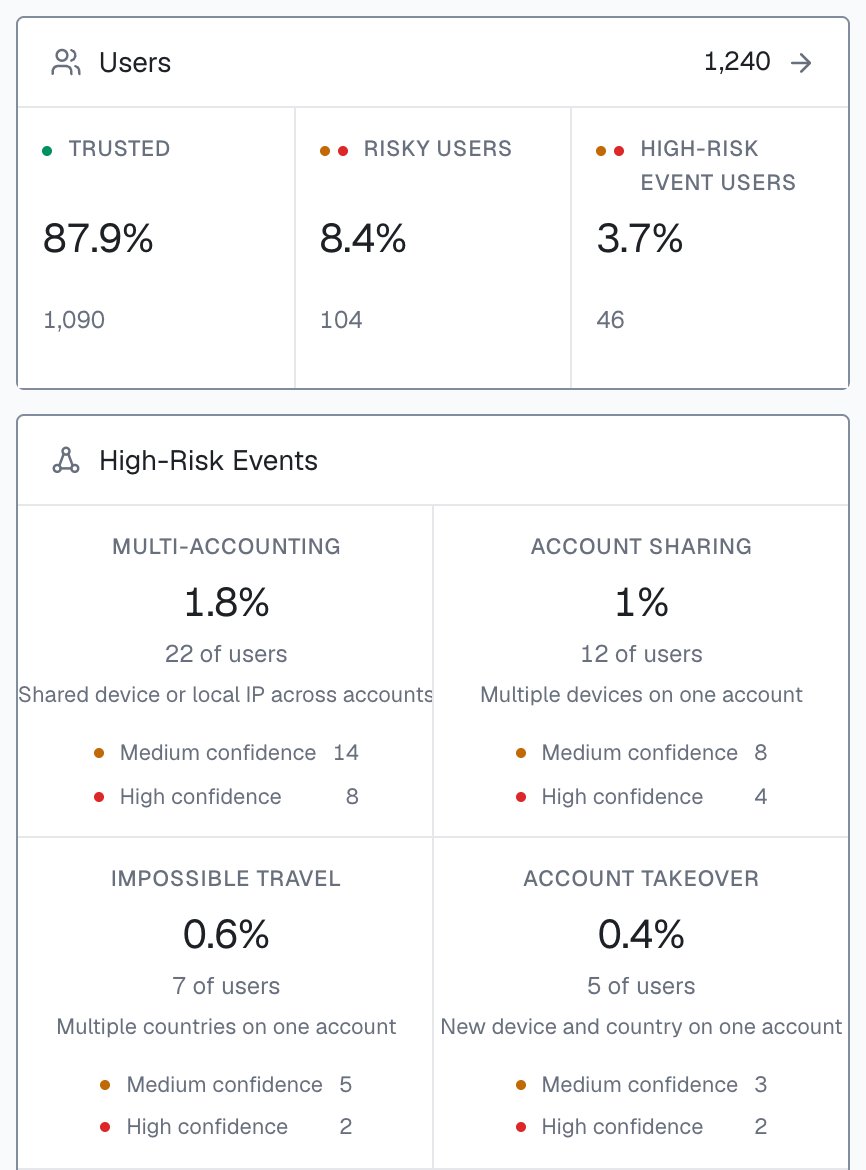
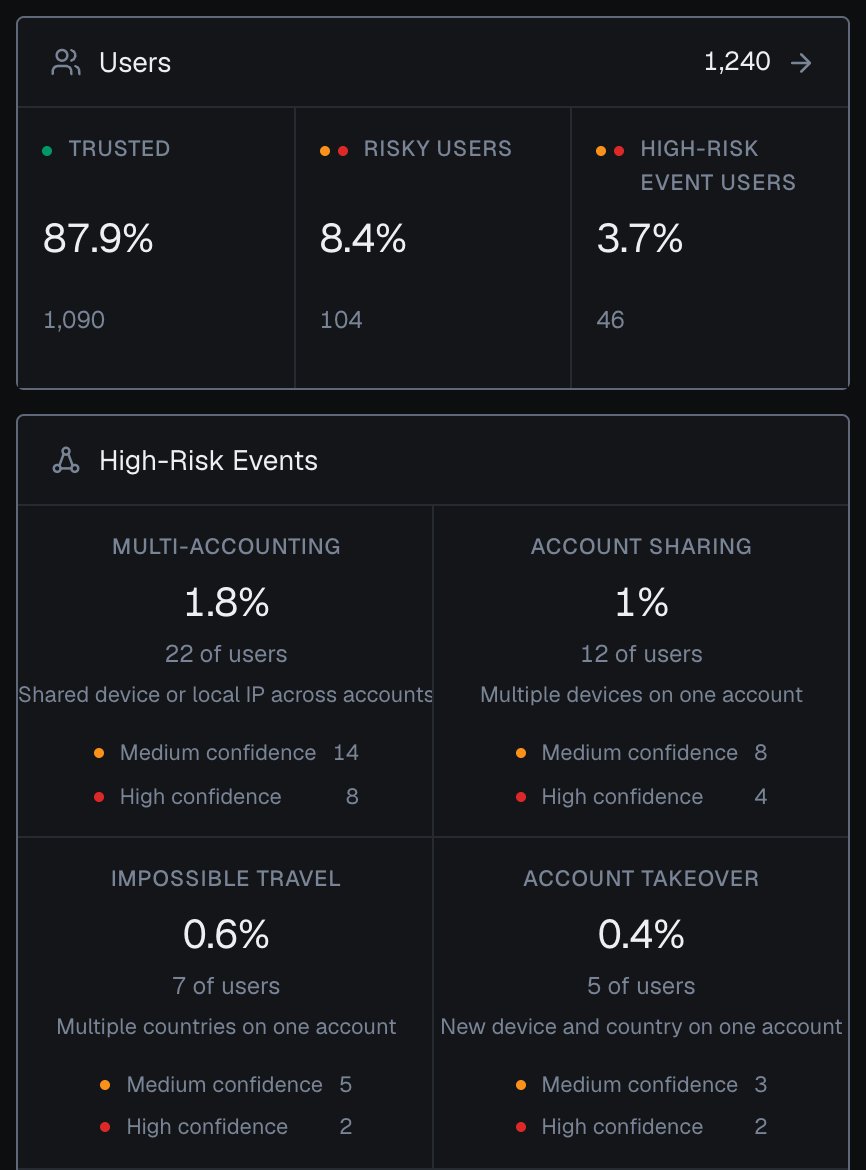 * **[Overview](/dashboard/overview).** The Users panel counts High-Risk Event users. The High-Risk Events panel shows each event's share of users, with its Medium and High confidence counts. Every tile opens Analytics with the matching filter.
* **[Analytics](/dashboard/analytics).** Filter any tab by **High-Risk Events**; on the Users tab that lists the users with the event, each with its band.
* **[User card](/dashboard/entity-card).** Event pills sit next to the user's band, above its linked devices, visitors, public IPs and local IPs.
* **[Identification card](/dashboard/identification-card).** The event chip appears under **Risk of the identities in this call**.
Events are counted for the users active in the selected period, and each share is a share of users. The High-Risk Events panel shows when events were last evaluated.
## Next steps
How each identification links to a user, a device, a visitor and IP addresses, each with its own risk.
How the account behind many identifications and the identification in front of you work together.
Choose an action for each user and each identification, at signup, login, checkout and withdrawal.
Link many accounts back to one person and act on them at signup and payout.
Step up or lock an account that is in someone else's hands.
The 0 to 100 Risk Score of each identification, its three bands, and the risk signals behind it.
* **[Overview](/dashboard/overview).** The Users panel counts High-Risk Event users. The High-Risk Events panel shows each event's share of users, with its Medium and High confidence counts. Every tile opens Analytics with the matching filter.
* **[Analytics](/dashboard/analytics).** Filter any tab by **High-Risk Events**; on the Users tab that lists the users with the event, each with its band.
* **[User card](/dashboard/entity-card).** Event pills sit next to the user's band, above its linked devices, visitors, public IPs and local IPs.
* **[Identification card](/dashboard/identification-card).** The event chip appears under **Risk of the identities in this call**.
Events are counted for the users active in the selected period, and each share is a share of users. The High-Risk Events panel shows when events were last evaluated.
## Next steps
How each identification links to a user, a device, a visitor and IP addresses, each with its own risk.
How the account behind many identifications and the identification in front of you work together.
Choose an action for each user and each identification, at signup, login, checkout and withdrawal.
Link many accounts back to one person and act on them at signup and payout.
Step up or lock an account that is in someone else's hands.
The 0 to 100 Risk Score of each identification, its three bands, and the risk signals behind it.